Fastmash
Fast command-line statistics for delimited text.
Fastmash summarizes, groups and reshapes delimited text and quoted CSV. It
accepts the command language of GNU datamash,
so if you already use datamash, you already know how to use Fastmash.
It also reads quoted CSV directly, gives your result columns stable names, calculates weighted means and selects the highest or lowest complete records. Inspect a table’s health or compare summaries from two exports with the same field selectors and portable arithmetic.
$ cat readings.tsv
site	reading
west	2
east	4
west	6
west	7
$ fastmash -H -s -g site count reading median reading < readings.tsv
GroupBy(site)	count(reading)	median(reading)
east	1	4
west	3	6
Install it with one command, or see other ways:
curl -fsSL https://fastmash.io/install.sh | sh
Fastmash is faster than GNU datamash*
Up to four times faster, on real jobs: quantiles, grouped summaries and millions of decimals.
* In 0.1.0, some disk-spilling sorts and the distinct-value geometric-mean job are slower on native Linux. All results and the method.
And better in other ways
| Feature | GNU datamash 1.9 | Fastmash |
|---|---|---|
| Results | Depend on the CPU and the C math library | Identical on every machine: all arithmetic in software |
| Locales | Need locale data installed; silently fall back to C without it | Built in: numbers in 318 locales, sorting in 194 |
perc:100 | Can read past the end of the values | Returns the largest value |
rmdup on several key fields | Crashes on an assertion | A clear refusal |
Malformed parameters such as strbin:2.0 | Misleading errors or undefined behavior | An accurate error message |
crosstab labels over 511 bytes | Truncated | Kept in full |
Everything else works the same: over 70 operations and modes, the same options, field selectors, grouping, headers and output. For most scripts, switching means changing one word. Migrating from datamash · All differences
Get started
- Install Fastmash on Linux x86-64 or WSL2
- Quick start: a five-minute tour
- Operations: every statistic and transformation
- Quoted CSV and result names: structured input and useful report labels
- Highest and lowest records: keep the records behind the numbers
- Table health and dataset comparison: inspect data and understand changes
Fastmash is open source under the MIT or Apache-2.0 license. Source on GitHub.
Install
Fastmash runs on Linux x86-64 and on Windows through WSL2. macOS on Apple Silicon is under development for 0.2.0. The published 0.1.0 release has Linux artifacts only. It installs next to GNU datamash without changing it. Native Windows is outside the current product scope.
Quick install
curl -fsSL https://fastmash.io/install.sh | sh
The script downloads the latest release,
checks its checksum and installs fastmash and fastmash-sort-supervisor
into ~/.local/bin. Set FASTMASH_INSTALL_DIR to install elsewhere, or
FASTMASH_VERSION for a specific release.
On Linux the script uses sha256sum. A macOS archive uses the system
shasum -a 256, and installs only fastmash. Rust and GNU coreutils are
not required to install an archive. Download and checksum failures leave an
existing installation unchanged.
The script checks the download against its published SHA-256 checksum. For a stronger check that the archive was built by this project’s release workflow, download it by hand and verify its GitHub build attestation:
gh attestation verify fastmash-v0.1.0-x86_64-unknown-linux-gnu.tar.gz --repo pederbe/fastmash
Prebuilt binary, by hand
Download a release from the
releases page, check it and
copy the two programs into a directory on your PATH:
version=0.1.0
name=fastmash-v$version-x86_64-unknown-linux-gnu
curl -LO https://github.com/pederbe/fastmash/releases/download/v$version/$name.tar.gz
curl -LO https://github.com/pederbe/fastmash/releases/download/v$version/$name.tar.gz.sha256
sha256sum -c $name.tar.gz.sha256
tar -xzf $name.tar.gz
mkdir -p ~/.local/bin
cp $name/fastmash $name/fastmash-sort-supervisor ~/.local/bin/
Replace 0.1.0 with the release you want, and keep fastmash and
fastmash-sort-supervisor from the same release in the same directory. If the
supervisor is missing, some large sorted jobs are slower; if it comes from
another release, the sorted jobs that use it stop with a message saying so.
With Cargo
If you have a Rust toolchain:
cargo install --locked fastmash
With cargo-binstall, Cargo downloads the prebuilt release binaries instead of compiling:
cargo binstall fastmash
These commands install published versions. Version 0.1.0 does not contain the native macOS development changes.
Homebrew on Linux
With Homebrew on Linux x86-64:
brew install pederbe/tap/fastmash
The maintainer’s tap builds the published source with its locked Rust dependencies. It installs both programs and their licenses and notices. Rust and Python are build dependencies; these source builds do not carry the performance qualification of the downloadable binaries.
Run brew test pederbe/tap/fastmash to check the installation. The test includes
the optional system-sort route and needs Linux 5.11 or later with coreutils
at /usr/bin/sort. Older kernels can use Fastmash’s built-in sorting.
Remove the package with brew uninstall pederbe/tap/fastmash.
Native macOS development archive
For Apple Silicon with macOS 15 or later, the native development workflow
builds one archive with a macOS 15 deployment target and tests those same bytes
on macOS 15 and 26. It contains fastmash, licenses and build provenance;
there is no macOS Sort supervisor. These CI artifacts are development builds,
not a published macOS release, and expire according to the run’s retention.
Choose a successful native macOS workflow run
and download its macos-archive artifact. With the GitHub CLI, use
gh run download RUN_ID --repo pederbe/fastmash --name macos-archive in an
empty directory. Replace RUN_ID with that run’s identifier. Confirm the
run’s source revision and native installation results before using its build.
Run this block in Bash; invoke bash first if using Fish. It stops on a
failed checksum before changing an existing installation:
bash -eu <<'EOF'
version=$(cat archive-version.txt)
name=fastmash-v$version-aarch64-apple-darwin
shasum -a 256 -c "$name.tar.gz.sha256"
tar -xzf "$name.tar.gz"
(cd "$name" && shasum -a 256 -c binary.sha256)
cat "$name/build-provenance.txt"
mkdir -p ~/.local/bin
staging=$(mktemp -d "$HOME/.local/bin/.fastmash.XXXXXX")
trap 'rm -rf "$staging"' EXIT
cp "$name/fastmash" "$staging/fastmash"
chmod 755 "$staging/fastmash"
mv -f "$staging/fastmash" ~/.local/bin/fastmash
printf '1\n2\n' | ~/.local/bin/fastmash sum 1
EOF
The final command prints 3. The archive label includes the source revision
and a macos-test suffix; --version reports the source’s current package
version. The provenance labels the artifact as a development test build.
For a future published macOS archive, the quick installer selects
aarch64-apple-darwin automatically and checks its SHA-256 file using the
native checksum tool. The current release’s quick-install URL cannot yet
deliver a macOS archive.
The archive is not Apple-notarized. Native CI records extended attributes, code-signing metadata and the assessment result for a terminal download, then executes the installed command without changing macOS security controls. Browser downloads can have different quarantine behavior and are outside these terminal checks. A checksum checks bytes, not Apple approval.
Debian and Ubuntu
curl -LO https://github.com/pederbe/fastmash/releases/download/v0.1.0/fastmash_0.1.0_amd64.deb
sudo apt install ./fastmash_0.1.0_amd64.deb
For Debian 10, Ubuntu 20.04 and newer. Remove it with sudo apt remove fastmash.
Fedora, RHEL and similar
sudo dnf install https://github.com/pederbe/fastmash/releases/download/v0.1.0/fastmash-0.1.0-1.x86_64.rpm
For Fedora, RHEL 8 and newer. Remove it with sudo dnf remove fastmash.
Check that it works
printf '1\t2\n3\t4\n' | fastmash sum 1 mean 2
This prints 4 and 3, separated by a tab. Next: the
quick start.
On Windows
Install WSL2, then
install Fastmash inside your Linux distribution as above. Keep your data in
the Linux file system (such as your home directory) rather than under
/mnt/c: it is much faster.
Uninstall
rm ~/.local/bin/fastmash
# On Linux, also remove the supervisor:
rm ~/.local/bin/fastmash-sort-supervisor
# or, if installed with Cargo or cargo-binstall:
cargo uninstall fastmash
Fastmash keeps no configuration files, caches or background services.
Building from source, verifying release archives and the full system requirements are described in System requirements.
Quick start
This tour takes about five minutes. It assumes Fastmash is installed. Every example reads from standard input, so you can paste it straight into a terminal.
Locale. The examples use decimal points. If your shell uses a locale with decimal commas or one Fastmash doesn’t know (see Locales), run
export LC_ALL=C.UTF-8first.
Your first summary
Fastmash reads records (lines) of fields separated by tabs, and applies one or more operations to selected fields:
$ printf '1\t2\n3\t4\n' | fastmash sum 1 mean 2
4	3
sum 1 adds up field 1; mean 2 averages field 2. Results are printed in the
order you ask for them, separated by tabs.
Several fields at once
A field list or range applies an operation to each field:
$ printf '1\t2\t3\n4\t5\t6\n' | fastmash sum 1-3
5	7	9
Grouping
-g groups records by a key field and summarizes each group:
$ printf 'A\t1\nA\t2\nB\t4\n' | fastmash -g 1 sum 2 count 2
A	3	2
B	4	1
Groups are made from adjacent records with the same key. If equal keys
can be scattered through the input, add -s to sort first:
$ printf 'b\t2\na\t1\na\t3\n' | fastmash -s -g 1 sum 2
a	4
b	2
Headers and named fields
With a header line, use -H to name fields and label the output:
$ printf 'site\treading\nwest\t2\neast\t4\nwest\t6\n' | fastmash -H -s -g site sum reading mean reading
GroupBy(site)	sum(reading)	mean(reading)
east	4	4
west	8	4
--header-in reads the names without printing an output header.
Other separators
-t sets a single-byte field separator, and -W splits on runs of spaces
and tabs:
$ printf '1,2\n3,4\n' | fastmash -t, sum 1-2
4,6
$ printf '1  2\n3   4\n' | fastmash -W sum 2
6
-t, splits on every comma, preserving datamash’s literal separator behavior.
For quoted CSV, use --csv to read and write CSV or choose input/output
independently with --csv-in and --csv-out:
$ printf 'region,revenue\n"west,coast",2\neast,4\n"west,coast",6\n' | fastmash --csv -H -s -g region --result-name=1:total sum revenue
GroupBy(region),total
east,4
"west,coast",8
Format switches do not infer headers. Quoted CSV and result names describes the supported modes and quoting rules.
Statistics
$ printf '2\n4\n4\n4\n5\n5\n7\n9\n' | fastmash median 1 q1 1 q3 1 pstdev 1 perc:90 1
4.5	4	5.5	2	7.6
See Operations for the full list: means, variances, quantiles, modes, skewness and kurtosis, normality tests, correlation and more.
Weighted means
Give each value a contribution weight with wmean VALUE:WEIGHT:
$ printf '10\t1\n20\t3\n' | fastmash wmean 1:2
17.5
Weights must be finite and nonnegative; a nonempty calculation needs positive retained weight. See Weighted mean.
Keep the highest records
Top-N selection retains complete records and keeps earlier input records on ties:
$ printf 'A\t8\nB\t10\nC\t10\nD\t9\n' | fastmash top:2 2
B	10
C	10
Use bottom:N for the lowest records, and -s -g for a cutoff in each group.
See Highest and lowest records.
Per-row operations
Some operations transform each record instead of summarizing:
$ printf '3.14159\thello\n' | fastmash round 1 md5 2
3	5d41402abc4b2a76b9719d911017c592
Missing values
--narm skips NA, N/A and NaN values:
$ printf '1\nNA\n3\n' | fastmash --narm mean 1
2
Next steps
- Fields and input: selectors, separators, headers, comments
- Grouping and sorting:
-g,-s,crosstab - Table health: inspect a table or validate supplied rules
- Dataset comparison: before/after summaries and ranked changes
- Migrating from GNU datamash
fastmash --helplists every operation and option
Migrating from GNU datamash
Fastmash accepts GNU datamash 1.9’s command language. In most scripts,
switching is a matter of replacing datamash with fastmash.
A safe way to switch
-
Install Fastmash alongside
datamash. Don’t alias or replacedatamash; keep both available while you compare. -
Run your existing command with both programs on the same input and with the same locale settings, and compare the output and the exit status:
export LC_ALL=C.UTF-8 datamash -s -g 1 sum 2 < data.tsv > gnu.out; echo "datamash: $?" fastmash -s -g 1 sum 2 < data.tsv > fast.out; echo "fastmash: $?" cmp gnu.out fast.out && echo identical -
If the outputs differ, check Differences from GNU datamash. If the difference isn’t listed there, please report it.
-
Change the script, and keep checking exit statuses as before.
What works unchanged
- Every GNU datamash 1.9 operation, mode and alias, except the explicit
linemode (writefastmash base64 1, notfastmash line base64 1) - Field numbers, lists, ranges, pairs and header names
- All options except
--sort-cmd, including short-option clusters (-sg1), abbreviated long options (--whitesp), options after operands, and-- POSIXLY_CORRECThandling- Output layout, header names and the
--fulloutput - Exit statuses 0 and 1 for success and ordinary errors
What to check
Locale settings. Fastmash has the glibc 2.43 locale rules built in:
numbers work in C, POSIX and every glibc locale with a one-byte decimal
separator, @ modifier locales included, and sorting in C, POSIX,
C.UTF-8 and 194 language locales checked against glibc. A name glibc has no
locale for behaves as C, as in GNU datamash. Commands that read or print
numbers exit with status 77 in ps_AF, and in a character set other than
UTF-8 whose thousands separator is not ASCII (such as fr_FR in Latin-1);
sorted commands do outside the sorting locales. GNU datamash falls back to C
where a locale is not installed, while Fastmash does not. Set
LC_ALL=C.UTF-8 (or C) in scripts. In language locales, Fastmash orders
sorted keys as GNU sort does under glibc, letters and digits by Unicode
collation and punctuation, symbols and spaces by glibc’s own table; keys that
differ only in punctuation next to digits (12-A and 1-2A), vulgar fractions
such as ¼ and some letters from outside the language’s alphabet can still
sort differently. Locales.
Last digits of results. Fastmash’s portable arithmetic can differ from a
local GNU build in the last printed digit of some results, or in the sign of
a nan. If a script compares numbers textually, compare with a tolerance or
fix the precision with --round. Numbers.
Exit status 77. Fastmash refuses some inputs that GNU datamash handles
unsafely, such as perc:2.5 or rmdup with several keys. A script that
treats any nonzero status as failure needs no change.
--sort-cmd. Not supported. To use a different sorter, sort the input
first and leave out -s:
LC_ALL=C sort -s -t "$(printf '\t')" -k1,1 data.tsv | fastmash -g 1 sum 2
Test suites. GNU datamash’s hidden testing options (---print-inf,
---print-nan, ---print-progname, ---rmdup-test) are not provided.
Remember
-t, splits on commas and does not parse quoted CSV, in both programs.
Fastmash adds explicit --csv-in, --csv-out and --csv switches for
quoted CSV; they leave existing separator commands
unchanged. Result names, weighted mean, Top-N selection, dataset comparison and
table health are also optional extensions.
spearson is the sample Pearson correlation, in both programs.
Compared with other tools
Fastmash runs GNU datamash commands with portable results, and extends that workflow with quoted CSV, weighted means, record selection, table health and dataset comparison. Other good tools cover much more ground. This page says honestly where each one fits. Facts about the other tools come from their own documentation (checked September 2026); tell us if something has changed.
At a glance
| Fastmash | GNU datamash | Miller | qsv | csvtk | |
|---|---|---|---|---|---|
| Command language | datamash’s | datamash’s | Its own verbs and DSL | Its own subcommands | Its own subcommands |
| Written in | Rust | C | Go | Rust | Go |
| Licence | MIT or Apache-2.0 | GPL-3.0-or-later | BSD-2-Clause | MIT | MIT |
| Input | Delimited text and explicit quoted CSV | Tab or single-byte delimited text | CSV (RFC 4180), TSV, JSON and more | CSV, TSV, Excel, Parquet and more | CSV and TSV |
| Quoted CSV fields | Yes, in supported calculation, selection and comparison modes | No | Yes | Yes | Yes |
| Grouped statistics | Yes | Yes | Yes (stats1 -g) | Through pivotp or sqlp | Yes (summary -g) |
| Joins, filters, reshaping | No | No | Yes | Yes | Yes |
| Platforms | Linux x86-64 | Linux, macOS, Windows and others | Linux, macOS, Windows, BSD | Linux, macOS, Windows | Linux, macOS, Windows, BSD |
GNU datamash
The original, and the reference Fastmash is measured against. It runs almost everywhere and is packaged by every Linux distribution, conda-forge and Homebrew.
Choose Fastmash when you run datamash commands on Linux and want them faster (up to 4 times on the published benchmarks), want the same digits on every machine, or want clear errors where datamash 1.9 aborts or reads past its data. Your commands don’t change; the differences are listed on one page.
Stay with GNU datamash when you need macOS, native Windows or a non-x86 CPU, or when you need a GNU-maintained tool. Some disk-spilling jobs still favor GNU on native Linux; the benchmarks show the costs and measurement conditions.
Miller
A complete toolkit for record-oriented data: it reads and writes CSV (with
quoting), TSV, JSON and several other formats, and has a full expression
language for filtering, computing new fields, joining, sorting, sampling and
reshaping. Its stats1 verb computes grouped statistics (count, sum, mean,
median and any percentile, mode, variance, skewness and more) without
sorting the input first.
Choose Miller when your data is JSON, or the job needs more than statistics: filtering, joining or transforming records. Choose Fastmash when the job is a datamash-style summary of delimited text and speed or exact datamash output matters.
qsv
A very fast, very broad CSV toolkit in Rust: indexing, joins (through Polars),
SQL queries, validation, sampling, format conversion to Parquet, Excel and
databases, and whole-column statistics. Grouped aggregation goes through
pivotp (count, sum, mean, median, quantiles, first, last) or sqlp.
Choose qsv when you work with large CSV files and want one tool for exploring, querying and converting them. Choose Fastmash when you want datamash’s operations and syntax, for example sample and population standard deviations, skewness and kurtosis, mode, collapse or crosstab per group, with datamash-identical output.
csvtk
A cross-platform CSV/TSV toolkit popular in bioinformatics, with subcommands
for selecting, filtering, joining, sorting, reshaping, converting
and plotting. csvtk summary computes grouped statistics (count, sum, mean,
median, quartiles, standard deviation, first, last, unique values, collapse),
printing two decimals by default.
Choose csvtk when you want a single, familiar toolkit for everyday table work, including quoted CSV and compressed files. Choose Fastmash when you need datamash’s full set of statistics and exact datamash output, or its speed on large inputs.
Using them together
These tools combine well. Fastmash can read quoted CSV directly:
fastmash --csv -H -s -g region mean price < data.csv
Use another tool to filter or join records, then Fastmash to summarize them. For ordinary text workflows, a quote-aware conversion remains useful:
mlr --icsv --otsv cat data.csv | fastmash -H -s -g region mean price
User guide
A Fastmash command has this shape:
fastmash [OPTIONS] OPERATION FIELDS [OPERATION FIELDS ...]
fastmash [OPTIONS] -g KEYS OPERATION FIELDS ...
fastmash [OPTIONS] MODE ...
fastmash [OPTIONS] top:N FIELD
fastmash [OPTIONS] compare BEFORE AFTER [rank RESULT [absolute|percent] [limit N]] OPERATION FIELDS ...
fastmash [INPUT OPTIONS] health [CONTROLS]
Fastmash reads records from standard input, splits each into fields, and applies the requested operations. It writes results to standard output and diagnostics to standard error, and reports success or failure through its exit status.
| Page | Covers |
|---|---|
| Fields and input | Field selectors, separators, headers, record terminators, comments, missing values |
| Quoted CSV and result names | Explicit CSV formats, quoting rules and stable output labels |
| Operations | Every summary statistic, with parameters and edge cases |
| Weighted mean | Contribution weights, complete-pair omission and numerical limits |
| Grouping and sorting | -g, -s, case-insensitive grouping, crosstab |
| Highest and lowest records | Complete-record selection, stable ties, groups and capacity limits |
| Dataset comparison | Before/after summaries, global key alignment and change ranking |
| Table health reports | Inspection, supplied validation rules and versioned TSV output |
| Per-row operations and modes | Rounding, binning, checksums, paths, cut, transpose, check, rmdup |
| Numbers, output and locales | Number formats, --format, --round, locales, portable results |
| Terminal color | Help, health and failure styling, detection and suppression |
| Errors, exit statuses and resources | What can fail, how it is reported, memory and disk use |
| Differences from GNU datamash | Every intentional difference |
fastmash --help prints a complete summary of operations and options.
Fields and input
Records and fields
Ordinary delimited-text input is a sequence of records, each ended by a
newline (or by a NUL byte with -z). The last record may omit its terminator.
Each record is split into fields, by default at every tab.
Carriage returns are kept as data in ordinary text, so files with Windows line
endings may need converting first (for example with tr -d '\r'). Explicit
quoted CSV input accepts LF and CRLF record endings
and permits line breaks inside quoted fields.
Selecting fields
Operations take a selector naming the fields to use:
| Selector | Meaning |
|---|---|
3 | Field 3 (fields are numbered from 1) |
1,4 | Fields 1 and 4 |
2-5 | Fields 2 through 5 |
1,3-4 | Field 1, then fields 3 and 4 |
price | The field named price in the input header |
2:3 | The pair of fields 2 and 3, for paired statistics |
1:2,3:4 | Two pairs |
A list or range applies the operation to each field in turn, producing one result per field. Repeating a field repeats its result. Ranges must be ascending, and a range cannot be combined with pairs.
Field separators
| Option | Effect |
|---|---|
| (default) | Fields are separated by a tab |
-t X, --field-separator=X | Fields are separated by the single byte X |
-W, --whitespace | Fields are separated by runs of spaces and tabs; leading whitespace is skipped |
--output-delimiter=X | Results are separated by X |
The output separator follows the input separator unless --output-delimiter
is given. With -W, the output separator is a tab.
$ printf 'a;1\nb;2\n' | fastmash -t ';' sum 2
3
-t, does not understand CSV quoting: a comma inside a quoted field still
splits it. Use --csv-in to read quoted CSV, or --csv for both input and
output. Format switches do not imply headers. CSV input conflicts with -t,
-W and -C; either CSV direction conflicts with -z and --vnlog.
See Quoted CSV and result names.
Headers
| Option | Effect |
|---|---|
--header-in | The first record names the fields; it is not treated as data |
--header-out | Print a header line naming each result |
-H, --headers | Both of the above |
With an input header, selectors can use field names. Names are exact and case-sensitive; if two fields share a name, the first one is used.
$ printf 'price\tunits\n3\t2\n5\t4\n' | fastmash -H sum units mean price
sum(units)	mean(price)
6	4
NUL-terminated records
-z ends records with NUL bytes instead of newlines, for input from tools
such as find -print0. Output records are NUL-terminated too.
Comments
-C (--skip-comments) skips records whose first non-blank character is #
or ;. Comment markers later in a record are data. Skipped lines do not count
towards line numbers in error messages.
--vnlog reads vnlog files: whitespace-separated
columns with a # name name … header line and # comments. In vnlog data,
everything after a # is ignored, even inside a field, and output uses spaces
with a # header.
Missing values
--narm skips fields whose exact text is NA, N/A or NaN, in any letter
case, for every operation:
$ printf '1\nNA\n3\n' | fastmash --narm sum 1 count 1
4	2
Only these exact words count as missing. An empty field is not missing: a numerical operation reports it as an invalid value. A record that lacks the selected field is an error.
For paired operations, each side skips its missing values independently, so the remaining values may pair up across different records.
Other options
| Option | Effect |
|---|---|
-f, --full | Print a complete input record before each group’s results. The record is the group’s first, unless first, last, rand or an extremum selects another. GNU datamash’s deprecation warning for this option is kept |
-S N, --seed N | Make rand reproducible. Without a seed, rand is not reproducible. Its selection, like GNU datamash’s, is slightly biased and not cryptographic |
--no-strict, --filler X | Accept ragged rows and set the missing-cell text for transpose and crosstab. They don’t fill in missing fields for summary operations |
-- | End option processing |
Output headers name each result after its operation and field, such as
sum(price), and grouping keys as GroupBy(site).
Options can appear after operations, and short options can be combined
(-sg1) as in GNU datamash. If the POSIXLY_CORRECT environment variable is
set, option processing stops at the first operation.
Quoted CSV and custom result names
Fastmash supports quoted CSV input and output, and optional names for calculated output columns. CSV is selected explicitly; ordinary delimited text stays the default.
| Workflow | CSV input/output | Result names |
|---|---|---|
| Aggregate and per-row reports | Yes, including supported grouping and full copied fields | Calculated output columns with an explicit output header |
| Weighted mean | Yes, including adjacent and sorted groups | One name per value/weight result |
| Top-N selection | Yes, including adjacent and sorted groups | No: selection copies the source fields |
| Dataset comparison | Yes; both sources use the same input format | One name throughout each summary’s before/after/change columns |
| Crosstab, field modes and legacy table modes | No | No |
| Table health | No; ordinary text input and readable or TSV output | No |
Custom result names
Give calculated output columns stable names in your reports. Select Output headers with
--header-out or -H, then repeat --result-name=INDEX:NAME for the labels you
want to replace. The separate form --result-name INDEX:NAME works too.
For example, a report can give its sum a stable schema name while retaining the generated label for its mean:
printf 'reading\n2\n4\n' | LC_ALL=C fastmash -H --result-name=1:total sum reading mean reading
total	mean(reading)
6	3
Indices follow Operation-produced output order after Selector expansion, starting
at 1. A list or range contributes each expanded result, repeated Operations
contribute their results again, and a paired Operation contributes one result.
Each field selected by cut also contributes a result. Grouping keys and the
copied fields from --full do not consume indices or receive replacement labels.
In this example, sum 2,1-2 produces three results in the order 2, 1, 2. Names
can be supplied out of order, and unnamed results keep their generated labels:
printf '1\t2\n3\t4\n' | LC_ALL=C fastmash --header-out --result-name=3:again --result-name=1:total sum 2,1-2
total	sum(field-1)	again
6	4	6
Names replace labels only. They do not change Selector lookup, required-field
checks, calculation values, output order, or when headers appear. Empty input
still produces no invented header; with -H, header-only input retains its
normal Output header without a result row. Later input or output failures can
leave partial output, as with ordinary generated headers.
INDEX must be an unsigned, nonzero decimal integer within the expanded result
count. Repeating a target, omitting a name, or supplying an empty name is an error.
Duplicate name values are allowed. Split at the first colon, so a name can itself
contain colons. Name bytes are preserved as supplied by the operating system.
For text output, names cannot contain the effective Output delimiter or Record
terminator. CSV output allows comma, quote, colon, CR and LF bytes in names and
encodes them as one field. Invalid names fail before any output.
Result names work for ordinary aggregate and Per-row operations, including
adjacent and sorted groups. Crosstab, table modes (transpose, check, rmdup)
and field modes (reverse, noop) refuse naming before reading input. Only the
exact --result-name spelling is accepted; existing GNU option abbreviations
retain their normal meanings. --vnlog alone does not satisfy the requirement
for explicit Output headers; add --header-out or -H.
GNU datamash 1.9 generates labels such as sum(reading). Stable custom report
labels otherwise need a wrapper or a downstream renaming step. Naming inside
the Command avoids that extra step and follows the existing header timing.
This is a convenience for report schemas, with no claim of faster computation.
CSV output from delimited text
Use --csv-out to produce quoted CSV from ordinary delimited-text input.
It works with aggregate and Per-row operations, including adjacent or sorted
groups, explicit headers and copied --full fields. Repeating the switch is
idempotent. It does not enable either Input or Output headers.
Top-N selection also supports CSV output from complete
selected text Records, including sorted Groups; it adds no calculation columns.
For example, tab-separated observations can become a CSV report with a stable result label, including keys and names containing commas or quotation marks:
printf 'place\treading\nlab,west\t2\nlab,west\t4\n' | LC_ALL=C fastmash --csv-out -H -g place --result-name='1:total,"daily"' sum reading
GroupBy(place),"total,""daily"""
"lab,west",6
Every logical output field is encoded separately: complete generated labels,
custom names, Grouping keys, formatted results and each copied --full field.
Commas separate fields and LF ends each emitted Record. A field containing a
comma, double quote, CR or LF is quoted, with internal double quotes doubled.
An empty field prints as "". Embedded line breaks retain their bytes. Output
is canonical; it does not retain an input field’s quoting style or line ending.
Decimal-comma formatted numbers and collapse or unique lists stay within one
quoted result field. The Collapse delimiter is still the list’s internal
separator; CSV adds no escaping scheme inside those lists. Encoding preserves
the result bytes, including non-UTF-8 and NUL bytes, under the existing Operation
and header display rules. For example, raw keys and copied fields retain NUL,
while selected text results and generated field-name displays stop at NUL as
they do in ordinary output. A leading UTF-8 BOM remains field data.
Output-only CSV allows text-input -t, -W and -C. An explicit
--output-delimiter, -z or --vnlog conflicts with CSV output and fails with
status 1, regardless of option order or a redundant delimiter value. Crosstab,
legacy Table modes and Field modes refuse CSV with status 77 before input.
Health reports remain text-only and reject CSV switches using their status-1
calculation-control diagnostic. Only the exact CSV switch spellings are accepted;
existing GNU option abbreviations retain their meanings.
CSV output retains empty-input and header-only timing and the normal failure policy. A later input, calculation or transport failure can leave partial output.
Calculations on quoted CSV
Use --csv-in for strict quoted CSV input with ordinary text output, or --csv
for CSV input and output together. --csv is equivalent to --csv-in --csv-out.
Repeating these exact-only switches is idempotent; none enables headers.
Top-N selection supports decoded CSV input for whole-dataset,
adjacent-Group and sorted-Group selection with either output format. Sorted
selection retains complete decoded Records and original-input ties through
bounded Spill. Its copied Output header uses the original source header or
first accepted source Record, independently of sorted encounter order.
Its ranking Field uses the decoded field-local numerical
contract, and copied data preserves complete bytes.
Aggregate and Per-row calculations support their existing positional
lists, numeric ranges, escaped named Selectors, paired Selectors and parameters.
Aggregate grouping and --full work with decoded CSV fields. Add -s to bring
equal decoded Grouping keys together, using bounded Spill when the input exceeds
the maintained sort-memory target. Per-row operations retain their ordinary conflict with
Grouping keys. With no Grouping keys, -s keeps the streaming workflow and source
order, including Per-row and --full reports. Output-only CSV retains sorted
text-input workflows.
For example, a quoted export can be summed directly, without a quote-aware preprocessing step, while preserving a comma in its decoded column name:
printf '"amount,raw",note\r\n"2","two\nlines"\n4,"a""b"' | LC_ALL=C fastmash --csv -H --result-name='1:total,"daily"' sum 'amount\,raw'
"total,""daily"""
6
Grouping keys compare decoded values, so west and "west" belong to the same
adjacent Group. Repeated keys in a later run stay separate without sorting:
printf '"region,name",value\n"west,coast",2\n"west,coast",4\neast,3\n"west,coast",5\n' | LC_ALL=C fastmash --csv -H -g 'region\,name' --result-name=1:total sum value
"GroupBy(region,name)",total
"west,coast",6
east,3
"west,coast",5
Multiple and named keys retain their normal request order, exact name lookup and
first-duplicate-name rules. Adjacent equality is byte-based, with ASCII folding
under -i where the selected locale supports it. Equal-length keys compare up
to NUL, while displayed keys retain their complete byte spans. Locale-aware
numeric input and output keep their existing rules; a language locale does not
silently merge differently spelled adjacent keys.
Sorting the same export merges the separate west,coast runs:
printf '"region,name",value\n"west,coast",2\n"west,coast",4\neast,3\n"west,coast",5\n' | LC_ALL=C fastmash --csv -H -s -g 'region\,name' --result-name=1:total sum value
"GroupBy(region,name)",total
east,3
"west,coast",11
Sorting compares complete decoded keys with the existing locale and case policy, then preserves source order for tied keys. Group equality remains distinct from locale ordering: differently spelled keys which the locale ties can still form separate adjacent Groups. Headers bind before sorting; without an Input header, a generated Output header takes its field width from the first sorted Record. Copied Records keep their actual widths and original logical Record/physical-line locations through reordering and representative selection.
CSV sorting uses the same sort-memory policy as ordinary text, including
FASTMASH_SORT_MEMORY_BYTES, and spills sorted runs to temporary files when
needed. Complete decoded fields and their original input locations survive sorting.
The memory target covers sort chunks, not the whole process; an oversized Record,
merge heads and retained statistical or text samples have their own storage needs.
Samples are not spilled. Temporary I/O errors fail with status 1, and checked
allocation failures refuse with status 77. Later failures may leave earlier output.
Full reports copy each decoded source field before the calculation results. For example, a Per-row report can retain a comma in a source field while selecting its numeric field with a custom result label:
printf 'place,value\n"west,coast",2\neast,4\n' | LC_ALL=C fastmash --csv -H --full --result-name=1:reading cut value
place,value,reading
"west,coast",2,2
east,4,4
For an aggregate, the representative starts as the Group’s first Record;
first, last, rand and improving extrema may select another Record under
their existing rules. Extrema ties retain the earlier selection. With multiple
Operations the representative need not supply every result. Aggregate --full
retains its existing GNU compatibility warning; Per-row --full does not warn.
Copied-field labels replace GroupBy labels, and Result-name indices still count
only Operation-produced results. Without sorting, header width comes from the
first logical Record; each copied data Record keeps its actual width, without padding or
filler. Required fields must still exist, including with --no-strict or
--filler. Copied fields preserve complete bytes, including NUL, independently
of an Operation’s display rules.
A double quote opens quoting only at the start of a field. Inside quotes, commas, CR and LF are data, and two double quotes decode to one. After a closing quote, only comma, LF, CRLF or end of input is allowed. Quotes within unquoted fields, stray bytes after closing quotes, unfinished quoted fields and bare CR outside quotes are errors, including in unused fields. Spaces are data, with no implicit trimming. LF and CRLF endings may be mixed; a complete final Record may omit its ending.
An empty file has no Records. Each blank LF or CRLF Record has one empty field;
quoted and unquoted empty fields decode identically. A trailing comma supplies
a final empty field, while a terminal Record ending supplies no extra Record.
Different widths are permitted when all requested fields exist. An absent field
still errors; an existing empty field is valid text but invalid numeric input.
--narm retains the existing exact, case-insensitive NA/N/A/NaN matching and
independent paired-side compaction. It does not skip empty fields or trim spaces.
Decoding preserves bytes, including tabs, NUL, non-UTF-8 and internal CRLF.
Operations keep their existing display and transformation rules: cut stops
display at NUL, while base64 and checksums consume the complete decoded field.
The active numerical locale and presentation settings apply to each isolated
decoded numeric field. An unused numeric neighbor cannot affect conversion.
Ordinary text numerical conversion keeps its existing behavior.
A leading UTF-8 BOM is data. Before an unquoted Input header it becomes part of the name and generated label, following the normal byte-escaped Selector rules. Before a quoted first field it is data followed by an illegal quote, so that export fails. There is no BOM stripping or transcoding. This dialect has stated byte and blank-Record extensions; it is not a claim of full RFC 4180 conformance.
With --csv-in, text results use the normal tab default and accept an explicit
--output-delimiter. Decoded delimiters or line breaks in result fields may make
that text report ambiguous; use --csv when field boundaries must survive output.
CSV input conflicts with explicit -t, -W and -C, including their GNU
abbreviations and redundant comma delimiters. Either CSV direction conflicts
with -z and --vnlog, in either option order, with Error status 1. Legacy modes
refuse CSV before input; Health rejects all CSV switches and remains text-only.
Unsorted input is read incrementally, with checked growth for decoded Record and Field storage. Adjacent Grouping and Per-row execution retain owned decoded Records without losing field boundaries or original locations when representative and spare storage swap. Statistical sample retention keeps its existing memory policy; parsing does not make samples spillable.
CSV validation errors identify the original logical Record number, counting an Input header, and its starting physical line. Syntax errors also identify the detected physical line and byte position, counting raw bytes including quotes; unfinished quotes identify unexpected end of input. LF inside quotes advances the physical line; CRLF counts as one line break. Header lookup errors include the header’s location when it exists. I/O failures keep their I/O context without inventing a Record or turning a read failure into a quoted-field EOF error. Malformed CSV uses status 1, checked Capacity refusals use 77, and output finalization retains normal precedence. Later failures can leave partial output.
Operations
Operations summarize a field over all records, or over each
group. Operation names are case-insensitive. Parameters follow a
colon: perc:90, trimmean:0.1.
For operations that transform each record instead, see Per-row operations and modes.
Counting and text
| Operation | Result |
|---|---|
count | Number of values, including text and empty fields |
countunique | Number of distinct values (case-sensitive unless -i) |
unique, uniq | Sorted, comma-separated list of distinct values |
collapse | Comma-separated list of all values, in input order |
first | First value |
last | Last value |
rand | One value chosen at random (reproducible with --seed) |
-c X (--collapse-delimiter) changes the separator used by unique and collapse.
Basic statistics
| Operation | Result |
|---|---|
sum | Sum |
mean | Arithmetic mean |
min, max | Minimum, maximum |
absmin, absmax | Value with the smallest or largest magnitude, keeping its sign |
range | max minus min |
Other means
| Operation | Result |
|---|---|
geomean | Geometric mean |
harmmean | Harmonic mean |
ms | Mean of the squared values |
rms | Root mean square |
trimmean[:P] | Mean after removing the fraction P of values from each end (default 0; 0.5 gives the median) |
wmean VALUE:WEIGHT | Weighted mean, with finite nonnegative contribution weights |
wmean takes one value/weight pair per result, for example wmean price:units
with named fields or wmean 2:3 with positions. It supports text or quoted CSV,
headers, custom result names and adjacent or sorted groups. A nonempty
calculation needs positive retained weight. --narm omits whole pairs after
checking supplied partners. See Weighted mean for examples,
missing values and numerical range limits.
Quantiles and order statistics
| Operation | Result |
|---|---|
median | Middle value, or the mean of the two middle values |
q1, q3 | First and third quartiles |
iqr | Interquartile range, q3 minus q1 |
perc[:N] | Nth percentile, for integer N from 1 to 100 (default 95) |
mode | Most frequent value (the smallest, on ties) |
antimode | Least frequent value (the smallest, on ties) |
Quartiles and percentiles use linear interpolation between order statistics (Hyndman and Fan’s type 7, the default in R and NumPy).
Dispersion
| Operation | Result |
|---|---|
pvar, svar | Population and sample variance |
pstdev, sstdev | Population and sample standard deviation |
mad | Median absolute deviation, scaled by 1.4826 |
madraw | Median absolute deviation, unscaled |
Shape and normality
| Operation | Result |
|---|---|
pskew, sskew | Population and sample skewness |
pkurt, skurt | Population and sample excess kurtosis |
jarque | Jarque–Bera normality test p-value |
dpo | D’Agostino–Pearson omnibus normality test p-value |
Paired statistics
These take a pair of fields, LEFT:RIGHT:
| Operation | Result |
|---|---|
pcov, scov | Population and sample covariance |
ppearson, spearson | Population and sample Pearson correlation coefficient |
dotprod | Dot product |
$ printf '1\t2\n2\t4\n3\t7\n' | fastmash scov 1:2 spearson 1:2
2.5	0.99339926779878
spearson is the sample Pearson coefficient, not Spearman’s rank correlation.
Small samples and missing data
jarqueanddpokeep GNU datamash’s formulas, including its tail cancellation: very small p-values can print as0.- Sample statistics need enough values:
svarandsstdevgivenanfor a single value;sskewneeds at least three andskurtat least four. - When every value in a group is missing (with
--narm),countandsumgive0;mean,medianand most statistics givenan;minandmaxgive-infandinf;firstandlastgiveN/A. - An empty input produces no output line.
Memory use
Most operations keep a running total. Quantiles, modes, dispersion, shape,
normality and paired statistics must keep every value of a group, and text
operations like unique and collapse keep their text. Memory then grows
with the size of the largest group, and this storage is not spilled to disk.
Related operations on the same field share storage: quantiles, mode and
antimode share one sorted copy, the variance family another, and the
moment and normality statistics another.
Weighted mean
Fastmash implements wmean VALUE:WEIGHT for ordinary
delimited-text or quoted CSV reports, across a whole dataset or within adjacent
or sorted Groups, with independently selected input and output formats.
Each pair produces one result: the sum of weight-times-value products divided
by the sum of retained weights. Contribution weights are finite, nonnegative
numbers. Fractions are valid, weights need not sum to one, and zero contributes
nothing. They describe relative influence, rather than requesting replicated
Records or weighted variance.
For example, values 10 and 20 with weights 1 and 3 produce 17.5:
printf '10\t1\n20\t3\n' | env LC_ALL=C fastmash wmean 1:2
17.5
Weights 0.25 and 0.75 give the same result for this exact example. Negative or nonfinite weights are input Errors with status 1. Both signed zeros are zero weights. A zero-weight Record still needs valid supplied Fields, but its product is not evaluated, even for an admitted infinite or NaN value. Positive weights permit admitted infinite and NaN values under the ordinary arithmetic rules. Later Records are still validated after such a result is known.
Named reports and adjacent Groups
Use explicit Input and Output headers with -H, or select them independently
with --header-in and --header-out. Named Selectors use the existing
case-sensitive first match for duplicate names; a backslash escapes one byte
in a name. Positional and named Fields may be mixed. Pair lists, repeated pairs,
shared weight Fields and same-Field pairs each produce a result in request order.
printf 'site\tvalue\tweight\na\t10\t1\na\t20\t3\nb\t5\t2\n' | env LC_ALL=C fastmash -H -g site --result-name=1:average wmean value:weight count value
GroupBy(site)	average	count(value)
a	17.5	2
b	5	1
Without a Result name, the generated label identifies both roles, for example
wmean(value,weight) or wmean(field-1,field-2). Each expanded pair consumes
one Result-name index; Grouping keys and copied --full Fields consume none.
Headers remain explicit. No count or total-weight column is added automatically.
Empty input produces no report; header-only input retains its ordinary Output
header and emits no data result. This includes sorted reports with named Fields
when input ends cleanly before the requested header. A present header still has
to contain the requested names, and a failed read is an input error.
Grouping uses the existing Group definition: consecutive Records with equal
Grouping keys. Multiple keys and existing case and locale controls apply.
Separated runs of the same key remain separate. The calculation resets between
Groups. Every requested Grouping key must exist, including with --full and on
omitted pairs; an empty key is still present. A preceding Group completes before
the next Group’s pair is collected, preserving its result or completion failure.
wmean leaves the ordinary --full representative unchanged, initially
the first Record; another requested Operation may replace it. It does not choose
the largest-weight Record. Aggregate --full retains its existing deprecation
warning.
For ordinary-text input, existing separators,
whitespace splitting, comment filtering, NUL Record termination, numeric locales,
--format and --round apply. Unused ragged or byte-oriented content remains
accepted when every required numeric and key Field exists; this calculation
does not inspect whole-table health.
Sorted text reports
Use -s to bring interleaved Grouping keys together. Multiple keys, named Fields,
headers, Result names and other aggregate Operations retain their usual behavior:
printf 'site\tvalue\tweight\nb\t5\t2\na\t10\t1\nb\t7\t2\na\t20\t3\n' | env LC_ALL=C fastmash -H -s -g site --result-name=1:average wmean value:weight
GroupBy(site)	average
a	17.5
b	6
The same calculation accepts a regular file, for example
env LC_ALL=C fastmash -H -s -g site wmean value:weight < measurements.tsv.
Eligible Sort routes, Hash grouping and its replay, and bounded Spill preserve
the encounter order of each Group’s contributions. Equal-key sorting is stable;
it does not rearrange a Group’s values or weights to improve the arithmetic.
Existing case and Supported-locale controls determine key ordering and equality.
With -W, blanks before a key can affect sorting before ordinary Group equality
is applied. With no Grouping keys, -s keeps the whole-dataset encounter order.
Both pair Fields are retained, including reversed pairs and shared Fields.
--full keeps complete representative Records using the existing selection rule.
Sort storage has its own memory policy and can Spill; the weighted accumulator
still keeps two totals per request. Ordinary sorted numeric errors use the
established sorted Record position, rather than claiming an original-input
location. Temporary-storage, replay, read, output and close failures prevent
successful status, and numerical-range Refusals remain unchanged.
Select --csv-out independently to encode results, keys, copied Fields and
generated or supplied labels through the existing output encoder:
printf 'site\tvalue\tweight\nb\t5\t2\na\t10\t1\na\t20\t3\n' | env LC_ALL=C fastmash --csv-out -H -s -g site wmean value:weight
GroupBy(site),"wmean(value,weight)"
a,17.5
b,5
Commas, quotes and line breaks in labels or copied Fields are quoted as needed; locale decimal commas are likewise encoded within one result Field. CSV output retains its existing conflicts with NUL Record termination and an explicit ordinary Output delimiter. It does not imply an Input or Output header.
Quoted CSV reports
Use --csv-in for CSV input with ordinary text output, --csv-out for CSV
output from ordinary text, or --csv for both. The switches do not imply
headers. Numeric conversion and named Selectors see decoded Field bytes,
including quoted names with commas, quotes or line breaks:
printf 'site,"value,raw",weight\r\nb,5,2\na,"10",1\nb,7,2\n"a",20,3\n' | env LC_ALL=C fastmash --csv -H -s -g site --result-name=1:average wmean 'value\,raw:weight'
GroupBy(site),average
a,17.5
b,6
Omit -s to report each adjacent run separately, or omit -g site to report
one whole-dataset mean. Regular-file input uses the same calculation. Sorting
compares decoded keys, so a and "a" name the same key. Multiple keys and
existing case and Supported-locale controls apply. Stable sorting and bounded
Spill retain complete needed Fields and each Group’s contribution order.
CSV output individually encodes results, keys, copied --full Fields, generated
paired labels and supplied Result names. For example, the generated label
wmean(value,raw,weight) is quoted as one CSV Field. Copied Fields preserve
complete decoded bytes, including non-UTF-8 bytes, NULs, internal CR/LF and
trailing empty Fields; their original quote spelling is replaced by canonical
encoding. A locale decimal comma is likewise quoted within one result Field.
CSV-to-text output retains ordinary text framing, so a decoded tab or newline
can appear as an ordinary delimiter or Record break. Choose CSV output when
those bytes need unambiguous Field boundaries.
Strict syntax validation covers every Field and Record, including unused content, omitted pairs and zero weights, even after an infinite or NaN result is known. LF, CRLF, multiline Fields, doubled quotes and a final complete Record without a terminator follow the existing CSV grammar. CSV input retains its option conflicts with text separators, whitespace splitting and comment filtering; either CSV direction conflicts with NUL Record termination and Vnlog. No autodetection or extra dialect is selected.
Numeric, invalid-weight, missing-Field and header errors retain the original logical Record and starting physical line through sorting and Spill. Syntax errors also identify the detected physical line and byte position. Completion errors identify the weighted pair and Group without assigning a source Record. Read, temporary-storage, output and close failures prevent successful status; earlier output can remain under the ordinary report rules.
Missing pairs and failures
With --narm, an exact whole-field NA, N/A or NaN token, ignoring case,
omits the entire value/weight pair for that request. Supplied nonmissing Fields
are validated in value-then-weight order before deciding omission.
Thus value NA with weight 2 is omitted, while
value NA with weight oops, -1 or infinity fails. Empty Fields, absent Fields,
malformed numbers and conversion range failures remain Errors. Surrounding
spaces, signed NaNs and NaN payloads do not become Missing values. Without
--narm, the ordinary numeric conversion rules apply.
Omission is local to each request. Another weighted pair or an unweighted Operation can still use the same Record. Grouping keys and Group changes are observed before omission. A nonempty dataset or Group with only zero or omitted weights fails with status 1, identifying the weighted pair and, when grouped, its keys. It does not silently disappear or produce a placeholder mean. Completion errors do not invent a source Record location. Earlier completed Groups, a header or part of the failing output Record may already have been written. Input, output and close failures also prevent successful status.
Numerical trace and limits
The calculation uses the current admitted binary80 arithmetic and presentation, without narrowing operands to binary64. It starts both totals at positive zero. For each retained positive-weight pair in encounter order it rounds the weight-times-value product, adds and rounds that product into the weighted total, then adds and rounds the weight into the weight total. Completion divides the totals with one rounding. Each step uses nearest-even rounding. There is no fused product/addition or rescaling. Results can depend on Record order; arbitrary weight scaling is not promised to preserve every rounded bit.
A numerical Capacity refusal with status 77 identifies a finite product that overflows or rounds a nonzero value to zero, an overflowing finite weighted total, an overflowing weight total, or an overflowing finite final division. The check happens when the intermediate is formed, even if later Records might cancel it. Deliberate infinite value inputs are distinguished from finite overflow. Finite subnormal intermediates, ordinary rounding and cancellation, and final-result underflow remain permitted.
These limits can refuse finite inputs whose mathematical mean is representable.
Value 2 with weight 1e4932 refuses at its product; value 1e-4000 with weight
1e-4000 refuses when its nonzero product rounds to zero. Scaling weights in
advance may change the evaluation trace and rounded result.
Unsorted wmean retains two numeric totals per request, independent of input
Record count. Full row context and other requested Operations keep their own
storage policies. This is not a total-process-memory or performance comparison.
Grouping and sorting
Groups
-g KEYS (also written groupby KEYS, grouping KEYS or gb KEYS) makes
Fastmash summarize each group of records that share the same key values.
Output rows start with the key values, followed by the results:
$ printf 'A\tx\t1\nA\tx\t2\nA\ty\t5\nB\ty\t4\n' | fastmash -g 1,2 sum 3
A	x	3
A	y	5
B	y	4
A group is a run of adjacent records with equal keys. When the key changes, the group ends and its results are printed. This makes grouping a single pass over the input, with memory proportional to one group.
If equal keys are not adjacent, the same key appears in more than one group:
$ printf 'b\t2\na\t1\nb\t3\n' | fastmash -g 1 sum 2
b	2
a	1
b	3
Sorting first: -s
-s sorts the records by their keys before grouping, so every key forms one group:
$ printf 'b\t2\na\t1\nb\t3\n' | fastmash -s -g 1 sum 2
a	1
b	5
The sort is stable: records with equal keys keep their input order, so
first, last and collapse give predictable results.
Key order depends on the locale. In C and C.UTF-8,
keys are ordered byte by byte. In the supported language locales, such as
en_US.UTF-8, fr_FR.UTF-8 or pl_PL.UTF-8, keys are ordered alphabetically,
as GNU sort orders them, using built-in Unicode collation rules and glibc’s
table of the punctuation and symbols it ignores.
If your input is already sorted, leave out -s: the result is the same and
the job is faster.
Large inputs
When standard input is a file (fastmash -s -g 1 sum 2 < data.tsv) and its
keys repeat, Fastmash does not sort the records at all: it collects each
group’s records as they arrive and sorts only the groups, which is faster and
needs memory only for the groups (hash grouping). The result is the same as
sorting’s. Where it could differ, for example when a record lacks a key field
or a value is invalid, or where the groups turn out to be too many, Fastmash
reads the file again and sorts it, so the output and any error are exactly
what the sort gives.
Input from a pipe (cut -f 1,3 data.tsv | fastmash -s -g 1 sum 2) is grouped
the same way in a language locale such as en_US.UTF-8: Fastmash keeps what
it reads in memory, as the sort would, so that it can sort it if it has to. A
job that gives up late, near the end of a large input, then takes somewhat
longer than sorting would have. In C and C.UTF-8, piped input is sorted,
which needs less memory there. FASTMASH_PIPE_GROUPING=sort sorts piped
input in every locale, and =hash groups it in every locale where Fastmash
sorts in process. With -W, input whose columns are separated by the same
blanks for each value is grouped this way too; where the same key comes with
different blanks before it, Fastmash sorts. --vnlog and rand always sort;
FASTMASH_GROUPING=sort makes every job sort.
Otherwise Fastmash sorts in memory, and when the data is large it writes sorted chunks
to temporary files in TMPDIR (default /tmp) and merges them. The files are
anonymous: the operating system removes them automatically, even if Fastmash
is interrupted.
A chunk holds each record’s grouping keys and the fields its operations use
(the whole record with --full, in language locales, or when the field
separator is a letter, a digit or the decimal point, which a number could run
on into) and 32 bytes per record for sorting. A sort starts with a 64 MiB
chunk. When it fills, Fastmash holds the whole input in memory instead, if
that fits: within the buffer GNU sort would use for an input file, a quarter
of the available memory, a share of what is free under any cgroup memory limit
(one per processor) or on the host (one per running Fastmash), and with less
than half the swap in use. For piped input it doubles the chunk each time it
fills, within the same bounds. Otherwise it spills. In language locales the
records are prepared for sorting on several threads, whose batches take a
sixteenth of the first 64 MiB.
FASTMASH_SORT_MEMORY_BYTES fixes the chunk’s memory target instead, and
FASTMASH_SORT_TRACE (set to anything) reports each decision on standard
error. Neither is a limit on Fastmash’s total memory use.
In language locales, records are prepared for sorting on up to 8 threads,
chosen as GNU sort chooses its default: the processors available to
Fastmash, or OMP_NUM_THREADS if it is set, capped by OMP_THREAD_LIMIT.
Set OMP_NUM_THREADS=1 to sort on one thread.
In the C, POSIX and C.UTF-8 locales, some operations still use the
system sort command, through Fastmash’s sort supervisor: rand, geomean,
harmmean, ms, rms, the skewness and kurtosis operations, jarque,
dpo, the paired statistics, and rmdup with -s. This route writes its
temporary files in a private directory in TMPDIR; see
System requirements for what it needs. In language locales
every operation uses Fastmash’s own sorter.
Ignoring case: -i
-i compares keys ignoring ASCII letter case, for grouping and sorting. The
output shows each key as it first appeared. -i also affects countunique
and unique. Under the Turkic character types (tr_TR, az_AZ and a few
others), where glibc does not fold i and I, -i is refused; set
LC_CTYPE=C.UTF-8 to fold ASCII letters.
Pivot tables: crosstab
crosstab KEY1,KEY2 (or ct) builds a two-way table with one row per value of the first
key and one column per value of the second. By default each cell is a count;
you can name one operation instead:
$ printf 'a\tx\t1\na\ty\t2\nb\tx\t3\n' | fastmash -s crosstab 1,2 sum 3
	x	y
a	1	2
b	3	N/A
Missing combinations show the --filler text (default N/A). Rows and columns
are ordered byte by byte. Use -s unless each combination’s records are already
adjacent.
Highest and lowest records
Fastmash supports Top-N selection from ordinary delimited text
or quoted CSV, across the whole dataset or separately within adjacent or sorted
Groups. Select one numeric Field with top:N FIELD for the highest
values or bottom:N FIELD for the lowest. N is mandatory, accepts leading
zeros, and must be an unsigned decimal integer from 1 through
18446744073709551615. The Field must be one positional or escaped named
selector, without lists, ranges or pairs. Named Fields require -H or
--header-in. Selection cannot be mixed with calculations or other Modes.
For example, given these tab-separated Records:
A	8	first observation
B	10	second observation
C	10	third observation
D	9	fourth observation
fastmash top:2 2 emits B then C with all their Fields.
fastmash bottom:2 2 emits A then D. Output is in numeric rank order. Equal
values keep original input order, and earlier Records win ties at the cutoff.
Duplicates remain separate observations; ties never expand the cutoff beyond N.
Fewer eligible Records yield fewer output Records, without padding.
Ranking uses the active Numerical profile and Supported locale, including its binary80 precision. Numbers that convert to the same value tie, regardless of their spelling. Both zero signs tie. Infinities sort beyond finite values in their numeric direction. Any unskipped NaN is an Error because it is unordered. Only the ranking Field must be numeric; accompanying Fields are copied without numeric checks.
With --narm, Records whose ranking Field is exactly NA, N/A or NaN, in
any letter case, are omitted. Matching does not trim whitespace. Empty or absent
Fields, malformed numbers, range failures, signed NaNs and NaN payloads remain
Errors. Empty and all-missing datasets emit no data Records. Every accepted
Record is checked, including late Records that cannot enter the selection.
Selection copies complete logical Fields in their original order, retaining
source numeric spelling, trailing empty Fields, ragged widths and arbitrary
accompanying bytes. It adds no score, rank or result column. Ordinary separators,
whitespace input, output delimiters, comment filtering and NUL-terminated Records
use the existing controls. Whitespace separator runs become the effective output
delimiter, and a final unterminated Record receives an output terminator.
Ordinary output does not escape embedded output delimiters or Record terminators
in copied Fields.
Use --csv-out to encode selected text Records as CSV, including sorted text
Groups. Use --csv-in to select decoded CSV Records with ordinary output, or
--csv for CSV input and output together. These exact-only switches are
idempotent and do not enable headers.
CSV input uses the existing strict comma/double-quote grammar, including doubled quotes, multiline Fields, LF or CRLF Record endings, blank Records and a final complete Record without a terminator. It does not trim values, strip a BOM, transcode bytes or normalize decoded newlines. Ranking reads only the decoded numeric Field, while ordinary text keeps its existing conversion across Field boundaries. Every CSV Field is structurally validated, including accompanying Fields on omitted Records and candidates that cannot win.
CSV output encodes each complete logical Field independently, preserving
numeric spelling, commas, quotes, CR/LF, NUL and non-UTF-8 bytes. It doubles
quotes, quotes empty Fields as "", and emits LF Record endings. Source quote
spelling and CRLF framing are not copied. Copied data remains complete even
where the separate header-label display convention stops at NUL.
--full is accepted with the same output and no deprecation warning. -s
without Grouping keys leaves this whole-dataset selection unchanged.
With -g FIELD[,FIELD...], each consecutive Group has its own cutoff. Groups
appear in encounter order, and rank order applies within each Group. For
example, fastmash -H -g category top:2 reading selects the highest two
Records in each adjacent category, binding category and reading from the
Input header. A later repeated category remains a separate Group. Selected
Records retain every Field once, without an extra Grouping-key prefix.
Multiple keys and -i follow the existing Group equality and Supported locale
controls; no-key -i leaves numeric ranking unchanged. Empty key text is a key
value, while an absent required key is an Error. Every required key and Group
boundary is checked before --narm omission, so an all-missing intervening
Group still separates equal-key runs on either side.
CSV keys compare decoded Field values, so different quote spellings of the
same text belong to the same adjacent Group.
Add -s to prepare interleaved categories under the existing sorted Group
workflow, for example fastmash -s -H -g category top:2 reading. Groups then
follow the existing key order, with ranking applied inside each Group. Sorting
keeps complete Records and original input identity through memory and Spill,
so earlier source Records still win equal-rank ties. Sorting order and Group
equality retain their existing distinct meanings: whitespace key separators,
case controls, language-locale spellings and NUL-terminated input can affect
the prepared runs without introducing global key normalization. Selection uses
the existing native sort for text and decoded CSV sort for quoted CSV.
Pipe and regular-file input use the same selection route for each format.
For example, fastmash --csv -s -H -g category top:2 reading selects the
highest two Records per category from an interleaved CSV export. Sorting uses
decoded key bytes, so quoted and unquoted spellings of the same key sort
together. Each selected Record keeps its complete decoded Fields, including
multiline notes, through sorting and Spill; CSV output encodes them again.
Locale ordering still does not merge differently spelled keys that existing
Group equality treats separately. No global key normalization is introduced.
--header-in consumes the first accepted Record as the Input header and
excludes it from ranking. Names resolve to the first matching label when a
header contains duplicates. --header-out emits one copied-field Output header
for the whole Command, without operation wrappers or appended Group labels;
-H selects both controls. With an Input header, copied labels follow the
existing display convention, stopping at the first NUL byte. Without one,
labels are field-1, field-2 and so on, using the first accepted source data
Record’s width even when that Record is omitted or does not win. Later ragged
Records do not revise the header, and sorting does not change its source schema.
Positional ranking Fields may extend beyond
the Input header’s labels when the data supplies them. Empty input invents no
header; header-only input with both controls and all-missing nonempty input can
emit a requested header without data. Name lookup fails before header output.
The entire input must be inspected before ungrouped data is emitted. Completed adjacent Groups can emit as the next Group begins. A read failure or malformed Record does not emit the incomplete current selection, but earlier Groups and the Output header may remain. Output writes and finalization must succeed; a later output failure can leave partial bytes. Sorted grouping finishes input intake before emitting selected data; a read or temporary-sort failure emits no incomplete sorted Group. Later ranking or key Errors can leave already completed Groups. Diagnostics retain original accepted Record numbers, including the Input header and excluding filtered comments. CSV input Errors identify the original logical Record and its starting physical line; syntax Errors also retain their detected location.
At most N candidate Records are retained for the current Group or whole dataset,
with storage growing as Records arrive and candidate state released between
Groups. A large requested N does not allocate N Records in advance. N limits
candidate count, not bytes or total process memory: large Records or a large N
can still exhaust memory. Checked resource failures refuse with status 77;
Fastmash does not truncate Fields, reduce N or approximate the winners.
Sorted grouping has a separate sort-memory target, controlled by
FASTMASH_SORT_MEMORY_BYTES, and Spills input when needed under the maintained
sort policy. Candidate retention remains bounded by N for the active Group
and does not Spill. Neither limit is a guarantee of total process memory.
CSV input conflicts with explicit text-input separators and
comment filtering. Any CSV format conflicts with NUL termination and --vnlog;
CSV output also conflicts with an explicit Output delimiter. Format conflicts
are Errors with status 1, independently of option order. CSV input with ordinary
output can use an explicit Output delimiter, subject to ordinary framing limits.
A named Field without -H or --header-in is a command Error.
Explicit result names, numeric presentation controls, Collapse delimiter,
Filler, random Seed, --no-strict, --vnlog and --sort-cmd are unsupported
for selection and refuse with status 77. Malformed options and conflicting CSV
controls retain Error status 1. Ordinary Commands keep their existing behavior.
Dataset comparison
Fastmash compares numerical summaries of two raw datasets:
fastmash compare before.tsv after.tsv sum 2 mean 3
BEFORE and AFTER are literal paths. A standalone - supplies stdin on one side:
producer | fastmash compare before.tsv - sum 2
Files are opened independently, even when both paths are identical. The before
source is read first, followed by after. Files are read as supplied, without a
snapshot or locking. Use the ordinary -- option terminator for paths beginning
with -. The same separator, whitespace and comment controls, Record terminator,
numeric locale, Missing-value policy and Operations apply to both sides.
Comparison supports whole datasets and positional or named Comparison keys with
single, list, range and paired Operation Selectors. All numerical aggregates, existing
aliases and parameters are supported, including wmean VALUE:WEIGHT.
Text-result aggregates such as first, unique and collapse are refused.
Input and output formats
Input and output formats are explicit and independent. The same input format applies to both sources; comparison does not infer a format or support different formats on the two sides.
fastmash --csv-in -g 1 compare before.csv after.csv sum 2
fastmash --csv-out -g 1 compare before.tsv after.tsv sum 2
fastmash --csv -H -g category compare before.csv after.csv rank 1 percent limit 10 sum reading
--csv-in reads strict comma-separated byte Fields and retains ordinary text
output. --csv-out encodes each complete output Field as CSV, with commas and
LF Record endings. --csv enables both. These switches are exact-only,
repeatable and header-neutral. Text input still supports its ordinary separator,
whitespace, comment filtering and NUL Record termination where allowed.
CSV quotes open only at a Field’s start; doubled quotes decode to one quote. Quoted Fields may contain commas, quotes, CR and LF. LF or CRLF ends a Record, and a complete final Record may omit its ending. A blank Record has one empty Field; a trailing comma adds another empty Field. Empty input has no Records. Bytes are retained without trimming, BOM stripping, transcoding or newline normalization, including NUL and non-UTF-8 bytes. Numeric conversion, names and Comparison keys use these decoded Fields. Equal decoded key bytes consolidate even when their original quote spellings differ.
Every CSV Field and Record is checked, including unused content, omitted pairs,
eligible keys below a ranking cutoff and content after a nonfinite result.
Malformed quoting and bare CR outside quotes are input Errors. CSV input
conflicts with explicitly supplied -t, -W and -C; either CSV direction
conflicts with -z and --vnlog; CSV output conflicts with an explicit
--output-delimiter. These conflicts are Errors regardless of option order.
CSV output from text input permits the text separator and comment controls.
CSV output individually encodes keys, labels, control/state columns, ranks and
numerical cells. Fields containing comma, quote, CR or LF are quoted, with
quotes doubled; empty cells print as "". A locale decimal comma remains inside
one quoted numeric Field. NUL and non-UTF-8 bytes remain intact. CSV-to-text
output supports an explicit Output delimiter but keeps ordinary unescaped text
framing: embedded delimiter or Record-ending bytes can make such text ambiguous.
Input and output headers
Use --header-in to consume the first accepted Input-header Record on each
source. -H also requests an Output header. A header-only source is valid and
has no summary; an entirely empty source, including one containing only filtered
comments, is an Error when input headers are requested. Named Fields must resolve
on both headers even when a source has no data. Headers are never inferred.
Named Selectors bind independently, so the same names can occupy different positions in the two exports:
fastmash -H -g category compare before.tsv after.tsv sum reading
fastmash -H -g category compare before.tsv after.tsv wmean reading:weight
Names use ordinary exact, case-sensitive lookup; the first duplicate label wins
and backslash escapes one byte, for example metric\,one. Positional and mixed
Selectors retain the requested positions on both sides. Unselected header Fields
may differ. With only --header-in, positional data Fields may extend beyond the
header labels. When producing an Output header, selected labels in its preferred
source must exist under the ordinary header renderer’s rules; unused after
labels do not constrain positional data.
--header-out or -H requests exactly one fixed Output header, including when
both sources have no data. There is no implicit comparison header. Labels use
the before Input header when available, otherwise ordinary field-N labels.
Keys are labeled key(FIELD_LABEL), followed by presence, rank and
rank_state. For each ordinary generated summary label L, the six labels are
before(L), after(L), difference(L), difference_state(L), percentage(L)
and percentage_state(L). Label display retains ordinary conventions, including
stopping at NUL; this never truncates Comparison-key identity or spelling.
Result names replace L throughout one summary’s complete block:
fastmash -H --result-name=1:total compare before.tsv after.tsv sum reading mean reading
fastmash --header-out --result-name=2:total compare before.tsv after.tsv sum 2,1
Indexes count expanded summary results in request order, once per result. They do not count the six derived columns, rename keys or control columns, or identify a ranking result by name. Names must be nonempty; each index can be supplied once, while different results may share a name. Text names must not contain the output delimiter or Record terminator; CSV output permits and encodes those bytes. Numerical formatting applies to summary and change values independently of their labels.
Both source headers, required named Binding, every input and all calculations must succeed before this Output header is written.
Report columns
Without keys, each nonempty dataset has one summary. Output has presence,
rank and rank_state, followed by six columns per expanded result in request
order. Without ranking, every rank is empty and every rank state is
not_requested:
| Column | Meaning |
|---|---|
| before | Completed numerical summary from BEFORE |
| after | Completed numerical summary from AFTER |
| difference | Signed after minus before |
| difference_state | available, unordered or not_matched |
| percentage | Signed ordinary percentage change, without a percent suffix |
| percentage_state | available, not_matched, zero_baseline, nonfinite_baseline or nonfinite_after |
Presence is matched, added or removed. An empty source has no summary;
an absent side and both changes have empty cells with not_matched change
states. Two empty sources produce no data. Accepted Records still establish a
summary when --narm omits every value. Those Operations keep their existing
empty-sample results or completion errors, including Weighted mean’s requirement
for positive retained weight. Paired Operations retain their established
independent compaction; Weighted mean validates partners and omits whole pairs.
Comparison keys
Use the existing -g Selectors to identify corresponding categories:
fastmash -g 1 compare before.tsv after.tsv sum 2 mean 2
fastmash -g 1,2 compare before.tsv after.tsv wmean 3:4
Every distinct key has one summary per source, even when its Records are
interleaved. Each repeated raw Record contributes normally. All Operations keep
the original encounter order within each key, including rounding-sensitive
Weighted mean calculations. -s is accepted and gives exactly the same report.
This consolidation differs from ordinary adjacent Groups; it does not change
their equality or the locale ordering of ordinary sorted Groups.
A key is an ordered tuple of complete Field byte strings. Field boundaries,
lengths and bytes after NUL all matter: ('a', 'bc') differs from ('ab', 'c'),
and 01 differs from 1. Whitespace is retained. -i folds only ASCII A
through Z across complete Fields; non-ASCII bytes remain unchanged. Empty key
text is valid, while a missing required key Field is an Error. Keys are extracted
before any Operation omits Missing values, so all-omitted categories remain in
the report and keep their ordinary completion results or errors.
Reports align the complete union of keys after both sources finish. Keys precede
the report columns above. A matched or removed key displays its first before
spelling; an added key displays its first after spelling, including under -i.
Unranked reports follow lexicographic order over normalized key tuples, using
unsigned bytes and shorter prefixes first. This order is independent of locale
collation and input adjacency.
For a finite nonzero baseline, percentage is (after - before) / before * 100.
The denominator retains its sign: -100 changing to -50 has difference 50 and
percentage -50; -100 changing to -150 has difference -50 and percentage 50.
Both zero signs make percentage unavailable. Reasons are checked in this order:
not_matched, zero_baseline, nonfinite_baseline, nonfinite_after.
NaNs and infinities remain visible in the before and after summary cells.
NaN differences, including equal-sign infinities, are unordered; other infinite
differences remain available.
Ranking and limits
Place rank RESULT [absolute|percent] after the source paths and before all
Operations. The default measure is absolute. RESULT selects one 1-based
expanded summary result, counting list and range expansion in request order;
Result names and the six derived columns do not affect its index. All requested
result blocks remain in the report:
fastmash -g 1 compare before.tsv after.tsv rank 1 sum 2
fastmash -g 1 compare before.tsv after.tsv rank 2 percent limit 10 sum 2-3
fastmash -H -g category --result-name=1:total compare before.tsv after.tsv rank 1 percent sum reading
Ranking orders matched keys by descending magnitude of the selected available difference or percentage. Signed cells keep their signs, including negative baseline percentages. For example, A changing from 100 to 130 ranks ahead of B changing from 10 to 20 by absolute change (30 versus 10); percentage ranking puts B first (100 versus 30). Matched zero changes are eligible. Available infinite differences rank above finite magnitudes in absolute ranking. NaNs and unavailable changes never participate.
Equal magnitudes, including opposite signs, both zero signs and infinities, tie by the normalized complete Comparison-key order. Input order and displayed rounding cannot change winners. Ranks are consecutive plain unsigned decimal numbers, even with hexadecimal or other numerical formats.
An optional limit N follows ranking and keeps at most N eligible keys, without
padding. Eligible keys below the cutoff are omitted. Every excluded key still
appears after the ranked portion in canonical key order, with an empty rank and
rank state one_sided for added/removed keys or unavailable otherwise. The
selected result’s change-state columns provide the exact reason. Thus N bounds
ranked keys, and total report records can exceed N. With no limit, every
rankable key appears; an entirely unrankable dataset still reports every key.
RESULT and N accept leading zeros, reject signs and overflow, and must be positive. N can be as large as 18446744073709551615, without reserving N entries in advance. Ranking and limit occur once in that order; limit requires ranking, and neither modifier can follow or interrupt Operations. Invalid modifiers or result indexes fail before sources are opened. Every source, key, requested summary and change must finish before cutoff selection and output, so a limit cannot hide a later Error or a failure in an unselected result.
Precision and completion
Changes use completed binary80 numerical values. Subtraction, division by the signed baseline and multiplication by exact 100 each round nearest-even, independently. Displayed values are never used as calculation inputs. Current numeric formatting and rounding controls apply to every numerical cell. Finite overflow in any new arithmetic stage refuses with status 77 and names the result and stage. Subnormal differences and exact cancellation are allowed. Distinct completed binary80 summaries have a nonzero relative difference of at least 2^-64, so percentage division and multiplication cannot underflow; equal summaries produce exact zero. The ordered trace can refuse extreme pairs even when their final mathematical percentage would fit, and it does not promise one correctly rounded evaluation of the full formula. Existing summary Operations retain their own numerical limits.
Every requested summary and change, both source scans and input completion must succeed before comparison writes stdout, including headers. Source errors identify before or after and the supplied path. CSV input Errors retain the original logical Record and its starting physical line; syntax failures also retain the detected physical line and byte when available. Completion/change failures name the side where applicable, result and key without inventing an input Record. Output write or finalization errors prevent success and can leave partial output. Key text, per-key Operation state and required statistical samples remain in memory under existing checked resource limits. Comparison streams intake without retaining complete raw Records for consolidation. It does not spill samples, approximate summaries or promise a fixed total-memory bound.
Comparison refuses Full rows, other Modes, --vnlog, --no-strict, explicit
Filler, Collapse delimiter, random Seed and --sort-cmd. Malformed commands and
conflicting format controls are Errors with status 1.
Table health reports
health inspects the entire accepted input and reports inconsistent record
widths, blank or duplicated header labels, and absent, empty or candidate-missing
field values. It counts lexical value types and shows inferred expectations with
their supporting counts. Inspection leaves your input unchanged.
fastmash health < table.tsv
fastmash --header-in health examples 2 < table.tsv
fastmash -t , -C health examples 0 < table.txt
fastmash --header-in health type price number nonmissing id width 3 validate < table.tsv
fastmash --header-in health tsv type price number nonmissing id validate < table.tsv > health.tsv
Readable reports use bold headings, yellow advisory markers and red violation
markers. Finding categories, their inferred or declared basis, counts, Field
names, observations and examples keep the default foreground. The wording carries
the same meaning without color. An advisory can appear in a successful
validate report; only violations of supplied Health expectations make validation
fail.
Styling is automatic on eligible stdout terminals. Pipes and redirected reports
stay plain by default; TERM=dumb and a nonempty NO_COLOR also suppress automatic
styling. Use --color=always to force it, or --color=never or --no-color to
suppress every style, including bold. These global controls work with health;
see terminal color for detection, precedence and examples.
Styles reset immediately after each heading or marker. Removing the generated
style sequences reproduces the complete plain report, including escaped bytes
and example limits.
The Table health report states the data-record, header-record and accepted-record
counts, effective input settings, numeric decimal separator, baseline width,
maximum data-record width and example limits. width N supplies the baseline and
checks both data records and an existing Input header. N can be zero; width does
not declare individual fields. Without a supplied width, an Input header supplies
labels and the baseline rather than data values. Without a header, the baseline
is the most frequent data-record width across the complete input, choosing the
smaller width on a tie. With neither a supplied width, data nor a header, the
baseline is unavailable.
width_mismatch counts data records that differ from the selected baseline.
For a supplied width it is a declared violation; otherwise it is advisory.
header_width_mismatch separately counts an Input header disagreeing with a
supplied width, including when there are no data records.
blank_header identifies each empty header position. duplicate_header identifies
every position sharing a nonempty exact-byte label. These findings are advisory.
A complete report succeeds even when findings exist. Record and header-field
counts and cell counts can overlap; adding them does not give a count of distinct
bad records.
Every field appearing in the Input header, a data record or a positional
declaration has absent_values, empty_values, missing_values, integer_values,
other_number_values and text_values counters, including zero counts. The six
categories partition the data-record count for each tracked field. An absent
field is a position beyond a record’s width; an empty field is present with
zero-length bytes. missing_values counts exact whole-field NA, N/A and NaN
tokens in any letter case, without trimming. Whitespace-only values and tokens
with extra characters are separate values.
An integer encoding allows the numeric grammar’s leading ASCII whitespace, an
optional sign and decimal digits consuming the whole field. Fractional, exponent
and hexadecimal encodings are other numbers even when their mathematical value
would be integral. Numbers must consume the whole field under the effective
locale’s numeric grammar, including recognized infinity and NaN encodings such
as -inf and nan(payload). A numeric prefix followed by extra bytes, trailing
whitespace or an embedded NUL is text. Classification uses syntax, without
conversion, rounding or arithmetic magnitude limits.
Absent, empty and candidate-missing values do not participate in inference.
If numeric values outnumber text, the inferred Health expectation is integer
when all numbers have integer encodings, otherwise number. If text outnumbers
numbers, it is text. A tie or no eligible values leaves it undetermined.
The report labels these expectations as inferred and shows their counts;
undetermined is an observation. These guesses cannot establish the intended
meaning of an identifier or distinguish a legitimate code from a missing token.
Positive counters produce absent_field, empty_field and missing_indicator
findings in that order, each counting data-record cells at its field position.
These are observations: an NA-like token can be a legitimate code. Inspection
does not change values or remove records. The Input header is excluded from cell
counts, and header-only input has zero observations. Fields appearing late include
earlier absent positions; positions outside the header have an empty label.
mixed_types follows the missingness findings and counts one field whenever
numeric and text encodings coexist. type_mismatch follows it and counts text
cells incompatible with an inferred integer or number expectation. Inferred text
does not reject numbers, and mixed integer/fractional numbers can share a number
expectation. Both findings remain advisory, including an inconclusive mixed-type
observation when numeric and text counts tie.
type FIELD integer, type FIELD number and type FIELD text supply a known
Health expectation, replacing inference for that field. Integer and number use
the lexical rules above; text permits arbitrary field bytes. Type checks exempt
absent, empty and candidate-missing values. A supplied integer rule rejects other
numeric encodings as well as text, even when their mathematical value is integral.
Mismatches are declared type_mismatch violations. The field’s inferred mismatch
is suppressed, while its counters and mixed_types observation remain visible.
required FIELD rejects absent and empty cells. nonmissing FIELD additionally
rejects candidate-missing indicators and works without required. When both are
supplied, nonmissing is the one effective presence rule. One declared
presence_mismatch finding per field counts failed cells without duplicating
the rules. A literal NA code can pass required/text checks and fail nonmissing.
FIELD follows the existing single-selector spelling, without lists, ranges or
pairs. In ordinary input, bare positive decimal integers are 1-based positions;
identifiers select exact Input-header names. Existing backslash escaping permits
special bytes and numeric names, such as \01 for a header named 01.
Under vnlog, numeric selectors remain names and never fall back to positions.
Named rules require an Input header and a unique full-byte match. Missing and
duplicated names are command errors before data processing or report output.
Ordinary positions remain usable with duplicated headers. Names and positions
resolving to the same field share their declarations and conflict checks.
Never-observed positional declarations are tracked without inventing intervening
fields or allocating through the largest declared position.
All controls may occur in any order. Identical declarations are idempotent;
conflicting types, widths or example limits are command errors. Repeated
validate switches are harmless. validate requires at least one supplied
type, presence or width rule. It emits the same complete report as ordinary
inspection and returns status 1 for declared violations, otherwise 0.
Observations and inferred suspicions alone do not fail validation. Empty input
has zero data records; header-only input has no per-cell or data-width violations,
while a supplied width still checks its header. There is no minimum-record rule.
examples N retains the earliest N examples per finding, with three by default.
Mixed types reserve the earliest numeric and earliest text witnesses when N is at
least two, then fill remaining slots with the earliest unused eligible cells.
With N equal to one, they retain the earliest eligible cell. Examples are printed
in input order. Mixed-type omissions count eligible numeric/text cells minus
retained examples, separately from the finding’s count of one field.
N is a nonnegative decimal integer; zero suppresses examples. Repeating the same
limit is harmless, while conflicting limits are command errors. Each sample
retains at most 128 raw bytes. The report discloses retained and omitted examples
and marks truncated samples. Header labels remain complete metadata.
Locations are 1-based accepted-record ordinals, including the Input header and
excluding filtered comments and annotations. They are not physical line numbers.
Header findings include their field position; width samples contain the raw
record without its terminator. Header-width samples preserve the raw accepted
header, including vnlog’s prefix and trailing blanks, within the same byte limit.
Field observations use their accepted-record ordinal and field position;
absent and empty samples contain no bytes and state
which condition was observed. Backslash, TAB, LF, CR and NUL are escaped as
\\, \t, \n, \r and \0. Other bytes outside printable ASCII use
\xHH with uppercase hexadecimal digits. This keeps binary bytes visible.
Input follows the existing Record intake and field separation: TAB by default,
literal -t separators, -W whitespace, -z NUL terminators, -C comment
filtering, Input headers and vnlog. -H/--headers contributes its Input-header
meaning; the report supplies its own headings. Empty records can have zero
fields, trailing empty fields are retained, and a final unterminated record is
accepted. Pipes and regular files produce the same report for the same input.
Sorting, grouping, full rows, numerical formatting, missing-value removal,
standalone output headers, result names and result delimiters are calculation
controls and fail in health. Quoted CSV input and output remain unavailable.
Unknown or incomplete controls are command errors.
TSV for scripts
tsv selects the same collected report in schema version 1. Readable output is
the default. The switch can occur anywhere among health controls, and repeating
it is harmless. Validation emits identical report bytes with or without
validate; declared violations determine its exit status.
TSV stays plain under every color control, including --color=always on a
terminal, so scripts receive the same schema and data bytes.
The mandatory header has 13 columns in this order:
row_kind category basis field_index field_name count count_unit record_index expected observed sample sample_truncated examples_omitted
Report records always use TAB separators and LF endings, including with -z
input. Inapplicable cells are empty. Zero counters are 0, integers use unsigned
decimal spelling and field positions are 1-based. String cells use the byte
escapes described above; decoding them recovers labels and retained samples
without confusing literal escape-looking text with byte escapes. Field names
retain the complete header bytes; positions beyond the header have an empty name.
The report begins with exactly these summary rows, in this order. Cells not listed are empty.
| Category | Populated cells |
|---|---|
| schema_version | observed 1 |
| data_records | basis observation; count; count_unit data_records |
| header_records | basis observation; count; count_unit header_records |
| accepted_records | basis observation; count; count_unit records |
| baseline_width | basis declared or inferred; count; count_unit fields; all three empty when unavailable |
| baseline_width_source | observed declared, header, modal or unavailable |
| maximum_observed_width | basis observation; count; count_unit fields; count empty with no data records |
| separator_kind | observed literal or whitespace |
| separator | observed literal separator bytes, empty for whitespace separation |
| record_terminator | observed lf or nul |
| numeric_decimal_separator | observed effective locale’s decimal-separator byte |
| input_header | observed yes or no for the selected setting |
| comment_filter | observed none, comments or vnlog |
| vnlog | observed yes or no |
| record_numbering | observed accepted_records_1based |
| example_limit | basis observation; count; count_unit examples |
| sample_byte_limit | basis observation; count 128; count_unit bytes |
Next, each tracked field in ascending position has six field rows in order:
absent_values, empty_values, missing_values, integer_values,
other_number_values and text_values. Each repeats field_index and field_name,
with basis observation, count and count_unit cells. These counters partition
the data records exactly, including zeros. A type_expectation row follows with
basis declared or inferred and expected integer, number or text;
undetermined instead has basis observation and expected undetermined.
A supplied presence rule adds one presence_requirement row with basis
declared and expected required or nonmissing.
Positive finding rows follow in this category order, then basis order
observation/inferred/declared, then ascending field position:
| Category | Basis | count_unit | expected |
|---|---|---|---|
| header_width_mismatch | declared | header_records | declared width |
| width_mismatch | inferred or declared | data_records | baseline width |
| blank_header | observation | header_fields | empty |
| duplicate_header | observation | header_fields | empty |
| absent_field | observation | cells | empty |
| empty_field | observation | cells | empty |
| missing_indicator | observation | cells | empty |
| mixed_types | observation | fields | empty |
| type_mismatch | inferred or declared | cells | integer or number |
| presence_mismatch | declared | cells | required or nonmissing |
Finding rows populate basis, applicable field identifiers, count, count_unit, expected and examples_omitted. Their record_index, observed, sample and sample_truncated are empty. Width findings have no field identifiers. Do not add overlapping findings into a count of distinct bad records.
Each finding is immediately followed by its retained example rows in input
order. They repeat category, basis, applicable field identifiers and expected,
then populate record_index, observed, sample and sample_truncated (yes or no).
Their count, count_unit and examples_omitted are empty. Width observed values
are field counts, with a raw-record sample. Header observations use blank or
duplicate, with a header-field sample. Field and presence observations use
absent, empty or missing_indicator; absent/empty samples are empty.
Mixed/type examples use integer, other_number or text.
Samples retain at most 128 raw bytes, independently of the full scan and labels.
Mixed-type omissions count eligible cells rather than the finding’s one field.
No other row categories occur in schema version 1; future schema changes must
identify their version.
Field counters, width summaries, header bytes and bounded examples remain in memory. Storage can grow with field count, distinct widths and the chosen example limit; there is no fixed memory guarantee or spill backend. Checked allocation or counter capacity failures refuse the command before report emission. A read failure prevents a report, and a failed report write returns failure. No numerical arithmetic is performed during inspection.
Per-row operations and modes
Per-row operations
Per-row operations produce one output record for each input record. They can be combined with each other, but not with summary operations in the same command.
Fields
| Operation | Result |
|---|---|
cut FIELDS, echo FIELDS | Print the selected fields of each record |
$ printf 'a\tb\tc\n' | fastmash cut 3,1
c	a
Numbers
| Operation | Result |
|---|---|
round | Nearest integer, halves away from zero |
floor, ceil | Round down, round up |
trunc | Round toward zero |
frac | Fractional part, keeping the sign |
bin[:WIDTH] | Lower bound of the bucket of width WIDTH (default 100) containing the value |
strbin[:COUNT] | Hash the field’s bytes into a bucket number from 0 to COUNT−1 (default 10) |
getnum[:TYPE] | Extract the first number found in a text field |
getnum types: n digits, i signed integer, p digits and dots (the
default), d signed digits and dots, h hexadecimal, o octal. Text with no
number gives 0.
$ printf 'item-42.5kg\n' | fastmash getnum 1
42.5
$ printf '17\n183\n' | fastmash bin:50 1
0
150
Text
| Operation | Result |
|---|---|
base64, debase64 | Encode or decode the field as Base64 |
md5, sha1, sha224, sha256, sha384, sha512 | Lowercase hexadecimal checksum of the field’s bytes |
dirname, basename | Directory part, or last component, of a path |
extname, barename | File extension, or file name without it |
MD5 and SHA-1 are provided for compatibility and checksums, not for security.
Path operations work on the text alone; they don’t touch the filesystem.
Field modes
| Mode | Effect |
|---|---|
reverse | Reverse the order of fields in each record |
noop, nop | Read the input and print nothing (useful for validation); with --full, print each record |
$ printf 'a\tb\tc\n' | fastmash reverse
c	b	a
Table modes
| Mode | Effect |
|---|---|
transpose | Swap rows and columns |
check [N lines] [N fields] | Verify every record has the same number of fields, and optionally the expected counts |
rmdup FIELD, dedup FIELD | Keep the first record for each distinct value of one key field |
health [CONTROLS] | Inspect structural issues, missing values and lexical types, optionally validating supplied rules |
$ printf 'a\tb\n1\t2\n' | fastmash transpose
a	1
b	2
$ printf 'x\t1\ny\t2\nx\t3\n' | fastmash rmdup 1
x	1
y	2
transpose and reverse require every record to have the same number of
fields. With --no-strict they accept ragged input, and transpose fills
missing cells with the --filler text (default N/A).
check prints a short confirmation and exits with status 0 when the table is
consistent, or reports the first inconsistent record and exits with status 1.
Table health reports inspect the complete accepted input,
with readable or schema-version-1 TSV output and bounded examples. Inferred
findings are advisory; validate fails only for violations of supplied type,
presence or width rules. Health accepts ordinary text input, not quoted CSV.
Selecting complete records
top:N FIELD and bottom:N FIELD keep the highest or lowest N records by one
numeric field. They copy every field in rank order, with earlier input records
winning ties. Add -g for a separate cutoff per group and -s for interleaved
keys. Text and quoted CSV, headers and sorted spill are supported. See
Highest and lowest records.
Comparing two datasets
compare BEFORE AFTER OPERATION FIELDS summarizes two raw datasets and reports
before, after, signed difference and percentage for each result. -g aligns
keys globally even when they are interleaved, and named fields bind independently
to each input header. Optional ranking highlights the largest changes while
keeping added, removed and unavailable keys visible. See
Dataset comparison for report columns and limits.
Numbers, output and locales
Calculation results always contain plain data, including when terminal color
is forced. Use quoted CSV to encode complete output
fields, and --result-name=INDEX:NAME with an output header to replace generated
result labels. Terminal color covers human-readable help,
health reports and failure prefixes.
Reading numbers
Numerical operations accept decimal numbers (42, -3.5, 1e-9),
hexadecimal floating-point (0x1.8p3), inf and nan. Leading blanks are
accepted. Anything else, including trailing blanks or an empty field, is an
error that names the line and field.
Printing numbers
By default, results are printed with up to 14 significant digits, like
printf "%.14g":
$ printf '1\n2\n' | fastmash mean 1 geomean 1
1.5	1.4142135623731
Two options change how results are printed. Neither changes how they are computed.
| Option | Effect |
|---|---|
-R N, --round=N | Print N digits after the decimal point (1 to 50) |
--format=FMT | Use a printf-style format with one %e, %f, %g or %a conversion |
$ printf '1\n2\n' | fastmash -R 3 mean 1
1.500
$ printf '1234567\n' | fastmash --format "%'.2f" sum 1
1234567.00
The ' flag groups digits with the locale’s thousands separator and grouping:
1,234,567.00 in en_US.UTF-8, 1.234.567,00 in de_DE.UTF-8,
12,34,567.00 in as_IN.UTF-8. In C it does nothing.
Limits
--format strings longer than 99 bytes are an error (status 1), as in GNU
datamash. So are column and operation names in a command longer than 511
bytes and, when the field delimiter could continue a number (-t ., -t e or
a digit, for example), numeric fields longer than 511 bytes. Otherwise numbers
and results have no fixed length limit.
Precision
Fastmash computes with 80-bit extended precision (a 64-bit significand, about 19 significant decimal digits), the same precision GNU datamash uses on x86-64 Linux. Sums are accumulated in input order.
Portable results
Fastmash implements its arithmetic in software, including its logarithms and exponentials. As a result, one Fastmash version gives identical results on every supported machine, independent of the CPU model or the system’s math library.
This also means Fastmash’s output can occasionally differ from a GNU datamash
build in the last printed digit, or in the sign of a nan. See
Differences from GNU datamash.
The rules for reading, computing and printing numbers are versioned together as a numerical profile. A Fastmash release that changes any numerical output says so in its changelog.
Locales
The locale decides how numbers are written and the order of sorted keys. Fastmash has the rules of the glibc locales built in, taken from glibc 2.43, so it does not need locale data installed on the system.
Numbers. In C, POSIX and C.UTF-8, and in the UTF-8 locales glibc
provides (such as en_US.UTF-8, fr_FR.UTF-8, nb_NO.UTF-8 or
hi_IN.UTF-8), numbers are read and printed with that locale’s decimal
separator, and the ' format flag uses its thousands separator and grouping.
An @ modifier glibc has a locale for, such as sr_RS@latin or de_DE@euro,
uses that locale’s rules, which can differ from its base’s; glibc drops any
other modifier, and so does Fastmash. A character set other than UTF-8 (a
.ISO-8859-1 codeset, or a name such as de_DE whose default is Latin-1)
keeps the locale’s rules where its separators are ASCII, and refuses numbers
where they are not (fr_FR’s thousands separator is U+202F). A name glibc has
no locale for, such as xx_YY.UTF-8, behaves as C, as in GNU datamash. The
one glibc locale whose decimal separator is not a single byte, ps_AF, is not
supported. Thousands separators are never accepted in input, as in GNU
datamash.
Sorted keys.
| Locale | Sorted key order |
|---|---|
C, POSIX, C.UTF-8 | Byte order |
194 glibc locales in 123 languages, such as en_US, de_DE, fr_FR, es_ES, it_IT, pt_BR, nl_NL, pl_PL, ro_RO, hr_HR, ru_RU and he_IL | Alphabetical, as GNU sort under glibc (Unicode collation for letters and digits, glibc’s table for punctuation, symbols and spaces) |
Other locales, such as cs_CZ, da_DK, el_GR, fi_FI, hu_HU, ja_JP, nb_NO, sv_SE, tr_TR, uk_UA and the Chinese locales | Sorting is refused |
A language locale is supported for sorting when Fastmash’s order of its
alphabet (its standard and auxiliary letters in the Unicode CLDR data, alone,
in pairs and in each case, and digits) matches GNU sort under glibc exactly. fastmash --help lists the
languages. Punctuation, symbols and spaces were checked the same way in every
one of them and order as in GNU sort, except next to digits in some keys
(12-A and 1-2A) and for vulgar fractions such as ¼; see
Differences.
Fastmash reads LC_NUMERIC (for numbers), LC_COLLATE (for sorting) and
LC_CTYPE (for quotation marks and -i) from the first non-empty value of
LC_ALL, that variable, and LANG, falling back to C.
With an unsupported locale, commands that
neither read nor print numbers (transpose, cut, first, unique,
checksums and the like, and count, countunique and strbin unless
--format or --round is given)
work normally. Commands that do are
refused with exit status 77 rather than risk reading numbers with the wrong
decimal separator, and the message tells you which setting to change:
fastmash: unsupported numeric locale ‘ps_AF.UTF-8’ from LANG
hint: set LC_NUMERIC=C.UTF-8, or a UTF-8 locale whose decimal separator is one byte
Two situations make GNU datamash differ, because it uses the installed locale data instead:
- If the locale is not installed, GNU datamash (and every other C program)
falls back to
Cfor everything, while Fastmash still uses the locale’s rules. Check withlocale -a. - A different glibc version can have slightly different data: for example,
glibc changed
fr_FR’s thousands separator to a narrow no-break space. This only affects the'format flag and sorting.
For scripts, setting LC_ALL=C.UTF-8 gives the same results everywhere.
Diagnostics are always in English.
Terminal color
Fastmash uses a small terminal palette to make human-readable output easier to scan. Help headings use bold default foreground; Commands, options and Operation names use cyan. Advisory findings use yellow. Errors, Refusals, Internal failures and violations of supplied Health expectations use red. Descriptions, values and examples keep the default foreground. Every style uses the terminal’s default background, and wording carries the meaning when styling is disabled.
The controls select whether eligible presentation is styled:
fastmash --color=auto --help
fastmash --color always --help
fastmash --no-color --help
fastmash --color=never --help
auto is the default. Each destination is checked separately: redirecting stdout
does not disable eligible stderr styling, and redirecting stderr does not disable
eligible stdout styling. Redirected output, failed terminal detection, TERM=dumb
and a nonempty NO_COLOR disable automatic styling, including bold. An empty
NO_COLOR permits automatic styling. always overrides these checks, including
for redirected presentation. never and --no-color suppress every generated
style.
Fastmash-authored failure diagnostics style only the existing program prefix,
such as fastmash:, in red. The prefix resets before the diagnostic body, so
multiline messages, hints and input bytes retain their default foreground.
Errors, Refusals and Internal failures share this failure role while keeping
their distinct text and exit statuses. Stderr eligibility controls the prefix
independently of stdout; a calculation piped to another program can still show
colored diagnostics in a terminal. Diagnostics forwarded from child programs
retain their existing bytes. Styling uses fixed sequences and does not require
allocating a new diagnostic message, including the low-memory fallback.
If argument collection fails before option scanning begins, no invocation control
has taken effect; that early fallback uses the default automatic stderr policy.
Readable Table health reports style their existing headings in bold, advisory
markers in yellow and declared violation markers in red. A finding’s structured
basis selects its marker; labels or samples containing those words do not receive
color. Each heading and marker resets immediately, leaving counts, observations,
Field names and examples plain. Color preserves the report contents and validation
status: advisory findings can remain yellow when validate succeeds. See
Table health reports for the distinction between inference and
supplied Health expectations.
Only help, Fastmash’s failure prefix and readable Table health reports are eligible
presentation surfaces. Calculation results, Dataset comparison reports, copied
Records, CSV, health TSV and version output retain their original bytes even with
--color=always. Color never decorates data or changes exit status.
Color controls require their exact spellings. Repeated controls follow the last
one reached by ordinary option scanning. As with existing options, -- ends
scanning and POSIXLY_CORRECT stops it at the first operand. Help and version
terminate scanning immediately, so place color controls before them:
fastmash --no-color --color=always --help
fastmash --color=always --help > help.txt
The palette and stream handling follow the CLI Guidelines, and environment suppression follows the NO_COLOR convention, with explicit invocation controls taking precedence. Fastmash also suppresses bold whenever styling is disabled.
Errors, exit statuses and resources
Exit statuses
| Status | Meaning |
|---|---|
0 | Success |
1 | Error: a problem with the command or its input, such as an unknown option, a non-numeric value, a missing field or a write failure |
77 | Refusal: Fastmash deliberately declined to produce a result, because a feature or locale is unsupported or a checked resource limit was reached |
70 | Internal failure: Fastmash detected a violation of its numerical invariants. Please report it |
When one failure follows another, such as a failure to write the output after
an error, the status is the more serious one: 70 over 77 over 1. If a
diagnostic itself cannot be written, the status is 1. A message containing
“internal”, or a process killed by SIGABRT, also indicates a bug: please
report it.
Diagnostics go to standard error, in the form:
fastmash: invalid numeric value in line 3 field 2: 'n/a'
Some are followed by a hint: line suggesting a fix.
In a terminal, the program prefix can appear in red; the message body keeps the
default foreground. Color controls change presentation,
never the exit status or calculation output.
Always check the exit status
Fastmash writes results progressively through a small output buffer, so a
command that fails part-way may already have printed earlier groups. In scripts, check the exit
status rather than whether output appeared, and in pipelines enable
set -o pipefail so an earlier command’s failure isn’t hidden:
set -o pipefail
if ! fastmash -s -g 1 sum 2 < data.tsv > totals.tsv; then
  echo "summary failed" >&2
  exit 1
fi
Dataset comparison completes both input scans and all calculations before
writing its report, including the header. Output write failures can still leave
partial bytes. Table health likewise completes inspection before report emission;
health ... validate can emit a complete report and return 1 for declared
violations. Advisory findings alone do not make validation fail.
Why refusals exist
Fastmash prefers a clear refusal to a doubtful answer. Examples:
- A non-integer percentile such as
perc:2.5. GNU datamash 1.9 reads an unset parameter for it and reports a misleading error. - Multiple key fields for
rmdup, which GNU datamash 1.9 aborts on. - An unsupported locale, where numbers might be read with the wrong decimal separator.
- A calculation that would need more memory than is available.
A refusal is not a claim that GNU datamash would reject the same input.
Memory
Fastmash has no fixed limits on record length, field count, number of
operations or number of values. (The few fixed limits that remain are GNU
datamash’s own, on --format strings, names in a command and, in one narrow
case, numeric fields; see Numbers.) Storage grows with the job and every
allocation is checked; if memory runs out, Fastmash refuses with status 77
where it can. The operating system may still stop a process that exhausts
memory before Fastmash can report it. When it stops the system sort that
some sorted jobs use (see Large inputs), the job
fails with status 1, naming the signal before “read error (on close)” as GNU
datamash does on Debian and Ubuntu:
Killed
fastmash: read error (on close)
What grows with the input:
- Operations that need every value (quantiles, dispersion, paired statistics,
unique,collapse) keep the values of the current group. rmdup,transposeandcrosstabkeep their tables in memory.- Top-N selection keeps at most N candidates for the active group or dataset; N limits record count, not bytes.
- Dataset comparison keeps keys, per-key calculation state and required samples in memory; these do not spill.
- Table health keeps field counters, widths, header labels and bounded examples in memory, with no fixed total-memory guarantee.
-skeeps a sort buffer, spilling to disk beyond the chunk target. Sorted numerical jobs keep the original records until they are processed.
Address-space limits
Some systems limit a process’s address space rather than its memory, for
example ulimit -v or a batch scheduler’s virtual-memory limit such as
h_vmem. The C library’s memory allocator (glibc malloc) gives each thread
that allocates an arena of its own, which reserves 64 MiB of address space,
more as it grows, and sorts in language locales run on up to eight threads.
Under such a limit, Fastmash therefore keeps the allocator to one arena for
each 512 MiB of the limit, from one (below 1 GiB) to eight. Threads that share
an arena wait for each other, so a sort that would also fit without the cap
can take somewhat longer. A number of arenas that GLIBC_TUNABLES
(glibc.malloc.arena_max) or MALLOC_ARENA_MAX sets is used instead, higher
or lower. If a sorted job still refuses under the limit:
GLIBC_TUNABLES=glibc.malloc.arena_max=1keeps the allocator to one arena at a limit of 1 GiB or more too;OMP_NUM_THREADS=1sorts on one thread (see Large inputs).
Disk
Sorting large inputs with -s writes temporary data to TMPDIR (default
/tmp), using anonymous files that the operating system removes automatically.
Where the filesystem has no anonymous files (O_TMPFILE), such as NFS or a
container’s /tmp on Linux before 6.10, Fastmash creates private files with
random names and removes their names at once, so they also disappear when
Fastmash exits. Sorted jobs that use the system sort (see
Grouping and sorting) write to a private
directory in TMPDIR, which the sort supervisor creates when the job starts
and removes when it ends, even if Fastmash is interrupted. Only killing both
processes at once, for example with kill -9 on the whole process group, can
leave it behind. Where TMPDIR is not a writable directory, these jobs sort
inside Fastmash instead. A sort that has to spill to disk without a usable
TMPDIR stops with “sort temporary I/O error” (status 1).
Interruption
An interrupted command can leave partial output. Treat output as complete only when the exit status is 0.
Differences from GNU datamash
Fastmash aims to behave exactly like GNU datamash 1.9. This page lists the known intentional differences and explicit extensions. Other differences in GNU-compatible commands are bugs: please report it.
Comparisons were made against GNU datamash 1.9 on x86-64 Linux. Other GNU versions and builds can differ from each other as well.
Fastmash extensions
These features extend the command language through explicit options, Operations or Modes. Ordinary GNU-compatible commands keep the compatibility rules on this page. The linked guides describe each extension’s supported combinations and limits; no comparative workflow speed or memory claim is implied.
- Quoted CSV and custom result names add explicit quoted input/output formats and supplied labels for calculation results.
- Table health inspects structural and missing-value observations, inferred types and supplied expectations, with readable and TSV reports and optional validation.
- Top-N selection returns the highest or lowest complete Records by one numeric Field, retaining original input order for ties.
- Weighted mean adds
wmean VALUE:WEIGHTwith finite, nonnegative contribution weights and checked numerical range limits. - Dataset comparison summarizes two raw datasets and reports their numerical changes, with complete Comparison keys and optional ranking.
- Terminal color styles help, failure prefixes and readable health reports on eligible terminals, or under explicit controls. Data output, health TSV and version bytes remain plain, even when color is forced.
Numbers
| Area | GNU datamash 1.9 | Fastmash |
|---|---|---|
| Arithmetic | The CPU’s x87 unit and the C math library | Software arithmetic, including log and exp; identical on every supported machine |
| Last digits | Depend on the build and the math library | Can differ from GNU in the last printed digit for some transcendental results |
| NaN from invalid arithmetic | Prints -nan on x86-64 | Always positive nan |
| NaN between two NaN inputs | Chosen by the x87 unit | The one with the larger payload, positive on a tie |
round, floor, ceil, trunc, frac, bin of -nan | Gives 0 | Keeps -nan |
log and exp at extreme arguments | Computed by the C library | A few boundary cases that cannot be settled within fixed limits are refused (status 77) |
Safety
| Area | GNU datamash 1.9 | Fastmash |
|---|---|---|
perc:100 | Can read past the end of the values | Returns the largest value |
Non-integer percentile, such as perc:2.5 | Reads an unset parameter; on x86-64 builds reports the misleading “invalid percentile value 0” | Refused, status 77, with a clear message |
rmdup with several key fields | Aborts on an assertion | Refused, status 77 |
Empty operation name, a pair whose second field is a range (1:2-3), strbin:2.0, numeric getnum type | Assertion failures or undefined behavior | Error, status 1, with a message |
The long --seed option | Mishandles its argument | Requires a value, like -S |
crosstab labels longer than 511 bytes | Truncated | Kept in full |
Unseeded rand when the kernel’s random source fails | Prints Error N and continues | Refused, status 77 |
| Running out of memory | “memory exhausted”, status 1 | Refused, status 77, naming what could not be stored; for an input record, “record memory allocation failed” |
Features
| Area | Fastmash |
|---|---|
--sort-cmd | Not supported; sort the input separately |
Explicit line mode | Not supported; per-row operations work without it |
Hidden test options (---print-inf and others) | Not supported |
| Locales | Built in from glibc 2.43 rather than read from the system: numbers in C, POSIX, C.UTF-8 and every glibc locale with a one-byte decimal separator, @ modifier locales included (in a character set other than UTF-8, where its separators are ASCII); sorting in C, POSIX, C.UTF-8 and 194 language locales checked against glibc. Other locales refuse commands that read or print numbers, or sort. A name glibc has no locale for behaves as C in both. Where a locale is not installed, GNU datamash falls back to C and Fastmash does not. Messages are in English |
| Sorted key order in language locales | As GNU sort orders them: letters and digits by Unicode collation, and the punctuation, symbols and spaces that GNU ignores except to break ties between otherwise equal keys by glibc’s own table, in its order (so a-1 before a_1 before a1, and aa before a+b); in the Spanish locales, gl_ES and pl_PL a space sorts before every letter and digit, as in GNU (San José before Sanabria). Some differences remain. glibc skips one character at the accent level in some runs of digits, punctuation and symbols that end before a letter, so keys that differ only in punctuation or spaces next to digits can come in another order: GNU sorts 12 A, 12-A, 12A, 1-2A and file1.txt, File1.txt, file(1).txt, where Fastmash sorts 1-2A, 12 A, 12-A, 12A and file(1).txt, file1.txt, File1.txt. A few symbols that glibc weighs rather than ignores sort differently, such as a vulgar fraction and the digits it stands for (¼ and 1/4), and in tk_TM the numero sign. Letters from outside the language’s alphabet can be placed differently, notably Hangul syllables, Georgian capitals, some Arabic letters, CJK Extension A/B and compatibility ideographs, and characters newer than glibc’s table. A letter written as one character sorts after the same letter written as a base and combining marks, as in GNU (e and U+0301 before é, Е and U+0308 before Ё). glibc departs from that for some letters with two marks, such as Vietnamese ổ and ǖ, which it puts first at the end of a key or before a letter, and Fastmash does not: it puts them after there too, and also where glibc decides by the second mark before an earlier difference (éǖ). Where glibc treats two spellings as the same letter (и and a combining breve, and й; L and a middle dot, and Ŀ; some Arabic, Indic, Thai, Lao and Tibetan vowel forms), the next key decides, and tied keys stay in input order, a Group per run of one spelling, as in GNU. Combining marks written in another order than Unicode’s (a with U+0301 then U+0323) sort as the Unicode collator reads them, not where glibc puts them. In cy_GB, sq_AL and sq_MK, ll before a middle dot sorts as l and ŀ, where glibc reads the locale’s ll and then the dot, so such a key ties with lŀ and the two form a Group per run in the input, where GNU orders them apart. Keys must be valid UTF-8 without NUL bytes, or the command is refused. rmdup -s --vnlog sorts # comment records with the data, as GNU datamash does (one can become the second header), so a comment whose key field is not valid UTF-8 is refused too |
| Quotation marks in messages | Curly quotes in UTF-8 locales; messages are never translated |
-i | Folds ASCII letters only; does not apply to column names or rmdup keys; refused under the Turkic character types az_AZ, crh_UA, ku_TR, tr_CY, tr_TR and tt_RU@iqtelif, where glibc does not fold i and I |
Unwritable TMPDIR | A sorted job fails only if the sort has to spill to disk (“sort temporary I/O error”, status 1), as in GNU datamash, but the two spill at different sizes: Fastmash only when memory does not allow it to hold the input (its sort starts at 64 MiB and grows within the available memory and any cgroup limit, or stays at FASTMASH_SORT_MEMORY_BYTES when that is set), and not at all when it groups input from a file by key instead of sorting it; GNU sort sizes its buffer from an input file and the host’s available memory, ignoring cgroup limits, and spills much sooner on piped input |
| Size limits | No fixed limits on records, operations, values or results |
Diagnostics
Error messages use the same wording as GNU datamash where it matters to
scripts, but some messages differ, and they begin with the program name, fastmash:. A few
failure paths also differ in detail: for example, a read error in input sorted
with -s can give just “read error: Input/output error”, where GNU datamash
prints the system sort’s message and “read error (on close)”; when standard
input cannot be read at all (opened for writing only), GNU datamash’s -s
prints an error from the shell that runs sort but ends with status 0, where
Fastmash reports the read error with status 1; and --help or --version into a closed pipe exits with status
77 rather than by SIGPIPE. Scripts should rely on exit statuses, not the
exact text of error messages.
On macOS, a sorted Command with a named Grouping key and no Input header
reports fastmash: missing input header for named grouping key and exits with
status 1. Linux retains the diagnostic from its external Sort route for that
case. A failed input read still reports the read error and exits with status
1; the missing-header diagnostic does not hide it. OS-owned diagnostic wording
is checked separately from Portable results.
System requirements
Most Linux systems from 2018 onward need nothing beyond the install steps. This page lists the details.
Platform
| Requirement | Why |
|---|---|
| Linux x86-64, glibc 2.28 or later (RHEL 8, Debian 10, Ubuntu 20.04 and newer) | Supported platform for the prebuilt binaries |
Linux x86-64 with glibc (x86_64-unknown-linux-gnu) | Building from source; musl and other targets are refused at compile time |
/proc mounted | Needed for the system sort route below; without it, those jobs sort in process, and output is written in 8 KiB blocks, even to a terminal |
A writable TMPDIR (default /tmp) | Temporary data for large sorted jobs |
The published 0.1.0 artifacts remain Linux-only. Native development builds
also admit Apple Silicon macOS 15 or later (aarch64-apple-darwin), with
native checks on macOS 15 and 26. Intel macOS, older macOS versions and native
Windows are outside the scope. See the development archive instructions.
macOS uses its system libraries and Fastmash’s built-in sorting with Spill.
It needs no /proc, GNU coreutils or Sort supervisor. A writable temporary
directory is still required for large sorted jobs. The same built-in locale
rules and Numerical profile apply; native GNU results do not redefine Portable
results. Missing Linux memory information does not impose a record limit.
Under an address-space limit (ulimit -v, as some batch schedulers set),
Fastmash reduces the address space that its memory allocator reserves; see
Address-space limits.
A few sorted (-s) jobs in the C locales, listed in
Grouping and sorting, use the system sort
when all of these hold: /proc is mounted and fastmash-sort-supervisor is
beside fastmash; /usr/bin/sort is an executable from GNU coreutils or
uutils coreutils (not BusyBox or Toybox); the field separator is ASCII; TMPDIR is writable; Linux
is 5.11 or later, with pidfds and close_range allowed; and the HUP, INT
and TERM signals are neither blocked nor ignored. Otherwise (for example
without the supervisor or /usr/bin/sort, under nohup, for command & in a
script, on an older kernel or in a restrictive container), those jobs sort
inside Fastmash instead, with the same output but more slowly on large input.
The system sort chooses its own buffer size and threads, as it does for GNU
datamash (Fastmash’s memory policy and FASTMASH_SORT_MEMORY_BYTES apply
only to its own sorting).
Locales
Fastmash has the glibc 2.43 locale rules built in, so you don’t need to install locale data. See Numbers, output and locales.
Verifying a release archive
Every release archive has a .sha256 checksum file, checked by the install
steps, and a GitHub build provenance attestation:
gh attestation verify fastmash-v0.1.0-x86_64-unknown-linux-gnu.tar.gz --repo pederbe/fastmash
The published benchmarks measure these exact binaries.
Building from source
git clone https://github.com/pederbe/fastmash
cd fastmash
cargo build --release --locked
# the programs are target/release/fastmash and target/release/fastmash-sort-supervisor
To build the current development source on Apple Silicon macOS 15 or later:
MACOSX_DEPLOYMENT_TARGET=15.0 cargo build --release --locked --bin fastmash --target aarch64-apple-darwin
# the program is target/aarch64-apple-darwin/release/fastmash
The macOS build needs Rust 1.88 or later and Apple’s Command Line Tools. Installing the archive needs neither. The Linux supervisor is not a macOS runtime component.
cargo install and source builds use your own compiler and settings. They
omit the prebuilt binaries’ branch-alignment tuning for some Intel processors,
so their speed can differ slightly. Keep --locked: it builds with the
tested dependency versions.
Benchmarks
Speed is Fastmash’s reason to exist, so every release is measured against GNU datamash 1.9 on the same machines, with the same data, and the results are published in full: wins and losses.
Fastmash 0.1.0
Mean of the two sessions’ median elapsed times, in milliseconds; lower is
better. Measured with the
0.1.0 release binaries themselves (fastmash sha256 1f1fec94…), the
same bytes you download. The chart is generated from
core-jobs.tsv by scripts/benchmark_chart.py.
The animated demo replays the Intel laptop’s RefGene quartile job below. Playback is slowed 20 times so that both runs are visible; its clocks show the measured times.
| Job | Data | Intel laptop, native Linux GNU → Fastmash | AMD desktop, native Linux GNU → Fastmash |
|---|---|---|---|
| Quartiles of exon counts | RefGene annotations | 112.8 → 26.6 (4.2×) | 50.3 → 13.1 (3.8×) |
| Transcripts per gene | RefGene annotations | 112.0 → 61.0 (1.8×) | 45.6 → 26.5 (1.7×) |
| Exon statistics per gene | RefGene annotations | 159.4 → 83.1 (1.9×) | 62.2 → 36.5 (1.7×) |
| Many small groups | Synthetic grouping data | 160.4 → 105.0 (1.5×) | 55.0 → 38.7 (1.4×) |
| Gene example from the datamash manual | Gene annotations | 7.3 → 3.8 (1.9×) | 3.0 → 1.6 (1.9×) |
| Sum and mean of a million decimals | Synthetic | 324.7 → 122.5 (2.7×) | 105.9 → 46.8 (2.3×) |
| Sum and mean of 100,000 decimals | Synthetic | 36.8 → 14.6 (2.5×) | 10.9 → 5.3 (2.1×) |
| Grouped decimals, 100,000 rows | Synthetic | 69.9 → 38.5 (1.8×) | 25.6 → 14.8 (1.7×) |
| One dominant group | Synthetic | 21.9 → 11.9 (1.8×) | 9.0 → 4.5 (2.0×) |
| Wine quality by grade | UCI Wine Quality | 6.4 → 3.2 (2.0×) | 2.8 → 1.4 (2.0×) |
| Large sort with disk spill | Synthetic | 572.4 → 694.1 (0.82×) | 180.0 → 309.7 (0.58×) |
Across 71 combinations of jobs and settings, 28 on the Intel laptop and 19 on the native AMD desktop meet the full speed-win rule: at least 20% and 5 ms saved in both sessions, with consistent paired runs. Both hosts have wins in all four non-startup workload families. Every job gives the expected output. The named slower and inconclusive cases below retain their individual dispositions. Full tables and the rules are on the method page.
Where GNU datamash is still faster
These jobs cross the material elapsed slowdown rule in both sessions. Each cell shows the two session medians in milliseconds:
| Host | Set and job | GNU datamash | Fastmash | Extra time per run |
|---|---|---|---|---|
| AMD desktop | Core, disk spill | 176.0 / 184.0 | 313.4 / 306.0 | 122–137 ms |
| AMD desktop | Dedicated disk spill | 177.0 / 175.6 | 303.8 / 319.5 | 127–144 ms |
| AMD desktop | Larger disk spill | 264.6 / 261.5 | 457.8 / 477.3 | 193–216 ms |
| Intel laptop | Core, disk spill | 573.7 / 571.0 | 694.5 / 693.8 | 121–123 ms |
| Intel laptop | Many keys | 788.6 / 772.0 | 959.4 / 970.9 | 171–199 ms |
| Intel laptop | Geometric mean, 200,000 distinct values | 37.3 / 37.5 | 44.7 / 44.9 | 7.4 ms |
These individual costs are accepted for 0.1.0. The AMD spill medians reach 1.83 times GNU’s time on these invocations. Lower CPU work and charged peak memory in the spill measurements are separate observations; the elapsed verdicts remain regressions. The geometric mean keeps the existing numerical precision and range checks.
Three further comparisons are inconclusive under the two-session rule:
| Host | Set and job | GNU datamash (ms) | Fastmash (ms) |
|---|---|---|---|
| AMD desktop | Many keys | 248.6 / 380.9 | 423.2 / 388.5 |
| Intel laptop | Dedicated disk spill | 580.7 / 961.9 | 714.8 / 832.3 |
| Intel laptop | Larger disk spill | 1943.6 / 892.4 | 1088.4 / 1069.7 |
These uncertain results are also accepted as named limitations. They establish neither a GNU competitiveness pass nor a win. All samples remain in the record, including an Intel dedicated-spill Fastmash run of 4.887 seconds. Session medians give no tail-latency guarantee or upper bound for other input sizes.
The decision retains the measured implementation: every predecessor elapsed and CPU guard passes, both hosts meet the workload-family and small-command rules, and all checked outputs match. The numbers concern the recorded warm-cache, disk-backed, 512 MiB command cgroup conditions on these two native Linux hosts. Untimed observations confirm actual spilling and correct output; they do not establish an I/O bottleneck.
Run them yourself
The benchmark kit runs eight of these jobs on your machine with both programs, checks that they agree, and prints a table you can share:
curl -fsSLO https://raw.githubusercontent.com/pederbe/fastmash/main/bench/fastmash-bench.py
python3 fastmash-bench.py
The best benchmark is your own job. Compare both programs on your data:
export LC_ALL=C.UTF-8
time datamash -s -g 1 median 2 < your-data.tsv > /dev/null
time fastmash -s -g 1 median 2 < your-data.tsv > /dev/null
For stable numbers, repeat each command several times, alternate the two programs, and use a quiet machine. hyperfine does this for you:
hyperfine --warmup 2 \
  'datamash -s -g 1 median 2 < your-data.tsv' \
  'fastmash -s -g 1 median 2 < your-data.tsv'
If Fastmash is slower on a job you care about, please tell us: slow real-world jobs are what we optimize next.
Benchmark method
Principles
- One build. Every number on the results page comes from the same release artifact. Results from different versions are never combined.
- Exact output first. A timing counts only if Fastmash’s output matches the expected output for that job.
- Same conditions. GNU datamash and Fastmash run on the same host, with the same input files and locale, and alternating order. Each invocation’s output is captured in files on the same filesystem and checked for equality. Input is redirected from regular files; piped input can perform differently.
- Repeated sessions. Each job runs in two separate sessions, each with one warm-up and six measured repetitions, alternating the programs. We report medians and keep the minimum and maximum. Files are in the page cache (warm-cache measurements).
- Resources as well as time. CPU time and peak charged memory (from cgroups) are recorded for every job.
Representative jobs
Jobs are grouped into job families, each representing a kind of work:
| Job family | What it measures | Example job |
|---|---|---|
| Startup | Fixed per-process cost | A tiny input |
| Decimal accumulation | Parsing and summing many numbers | Sum and mean of a million decimals |
| Retained numerical summaries | Operations that keep every value | Quantiles by group |
| Grouped numerical analysis | Grouping with numerical operations | Exon statistics by gene |
| Grouped text and counts | Grouping with text operations | Unique values by key |
Datasets include public real-world data (RefGene genome annotations, the UCI Wine Quality data) and generated data with controlled shapes. The benchmark kit runs eight of the core jobs with their exact arguments, downloads the public data and regenerates the synthetic inputs from the same fixed seed.
Acceptance rules
The rules are fixed before a release candidate is measured:
| Rule | Threshold |
|---|---|
| A job counts as a win | At least 20% lower median elapsed time and at least 5 ms saved per run, in both sessions and in at least five of six paired rounds |
| Fastmash is “faster” overall | On each host: wins in at least three of the four non-startup job families, including real-data wins in at least two; no unresolved material slowdowns; small commands within their limits |
| Material slowdown | Median elapsed time more than 10% and more than 5 ms longer |
| Small commands | At most 5 ms slower than GNU datamash, and at most 20 ms in total |
| CPU slowdown | More than 20% and more than 5 ms extra CPU time |
| Memory review | Peak memory more than twice GNU datamash’s and 64 MiB more |
A job that fails, times out or gives a wrong answer counts as a failure, not a result. Each candidate is also compared with the previous accepted Fastmash build on every existing job (the predecessor guards); a slowdown beyond these limits needs an explicit, published justification.
Hosts
| Host | CPU | OS | glibc | System sort |
|---|---|---|---|---|
| Laptop | Intel Core i7-8550U | CachyOS, native Linux 7.2.9 | 2.44 | GNU coreutils 9.12 |
| Desktop | AMD Ryzen 7 9800X3D | CachyOS, native Linux 7.2.9 | 2.44 | GNU coreutils 9.12 |
GNU datamash’s -s jobs sort with the system sort, so its speed is part of
their times.
Each complete command and its children run with a 512 MiB cgroup memory
limit, no swap, at most 64 tasks (processes and threads), a 30-second timeout
and a 512 MiB per-file output limit. Temporary files
are on disk-backed Linux storage. Both programs get the same limits;
Fastmash’s sort memory override is unset. These conditions matter for large
sorts: the memory available to a command affects when it writes runs to disk.
Separate, untimed observations confirm that the disk-spill and spill-large
jobs write temporary runs on both hosts under these limits and still produce
the expected output.
Full results
Mean of the two sessions’ median elapsed times, for every job and setting in the
0.1.0 measurement (release binary 1f1fec94…, 5 and 6 October 2026). Every job gave
the expected output on both hosts. Sets: core and supplement are the
representative jobs; locale-C, locale-en and locale-de repeat
locale-sensitive jobs under C, en_US.UTF-8 and de_DE.UTF-8; guards
are small edge-case jobs; the spill sets exercise larger sorts and their
boundaries. CPU time and peak memory are in the measurement record.
The displayed means average the retained session medians, already rounded to
0.1 ms, then round that mean to 0.1 ms. Ratios use the displayed values.
Precise unrounded samples remain in the measurement record.
The elapsed verdict preserves each comparison’s two-session result. A regression crosses the material slowdown limits in both sessions, with Fastmash slower in at least five of six paired rounds in each. A threshold or direction disagreement is inconclusive; it does not establish a win or a competitive pass. Within margins means both sessions stay within the material regression limits. The named limitations retain the practical costs and uncertainty.
Intel laptop, native Linux
| Set | Job | GNU datamash 1.9 (ms) | Fastmash 0.1.0 (ms) | GNU / Fastmash | Elapsed verdict |
|---|---|---|---|---|---|
| core | decimal-1000 | 1.6 | 1.6 | 1.00× | Within margins |
| core | decimal-100000 | 36.8 | 14.6 | 2.52× | Within margins |
| core | decimal-1000000 | 324.7 | 122.5 | 2.65× | Within margins |
| core | disk-spill | 572.4 | 694.1 | 0.82× | Regression |
| core | dominant-group | 21.9 | 11.9 | 1.84× | Within margins |
| core | gene-many | 160.4 | 105.0 | 1.53× | Within margins |
| core | gene-tiny | 2.6 | 1.4 | 1.86× | Within margins |
| core | genes-example | 7.3 | 3.8 | 1.92× | Within margins |
| core | grouped-decimal-100000 | 69.9 | 38.5 | 1.82× | Within margins |
| core | refgene-exons | 159.4 | 83.1 | 1.92× | Within margins |
| core | refgene-quantiles | 112.8 | 26.6 | 4.24× | Within margins |
| core | refgene-transcripts | 112.0 | 61.0 | 1.84× | Within margins |
| core | scores-by-major | 2.6 | 1.4 | 1.86× | Within margins |
| core | tiny-count | 1.2 | 1.5 | 0.80× | Within margins |
| core | tiny-decimal | 1.2 | 1.5 | 0.80× | Within margins |
| core | wine-by-quality | 6.4 | 3.2 | 2.00× | Within margins |
| core | wine-red-summary | 1.7 | 1.6 | 1.06× | Within margins |
| core | wine-white-summary | 4.6 | 2.8 | 1.64× | Within margins |
| disk-spill | disk-spill | 771.3 | 773.5 | 1.00× | Inconclusive |
| guards | distinct-20000-geomean | 4.8 | 5.9 | 0.81× | Within margins |
| guards | distinct-200000-geomean | 37.4 | 44.8 | 0.83× | Regression |
| guards | extreme-unique-128 | 1.1 | 1.4 | 0.79× | Within margins |
| guards | extreme-unique-20000 | 4.9 | 7.2 | 0.68× | Within margins |
| guards | missing-pairs | 3.0 | 1.8 | 1.67× | Within margins |
| guards | moments-all-100000 | 69.9 | 29.6 | 2.36× | Within margins |
| guards | moments-alternating-100000 | 69.8 | 52.8 | 1.32× | Within margins |
| guards | paired-all-100000 | 110.2 | 68.4 | 1.61× | Within margins |
| guards | subnormal-unique-128 | 1.1 | 1.7 | 0.65× | Within margins |
| guards | subnormal-unique-20000 | 10.6 | 8.8 | 1.20× | Within margins |
| locale-C | locale-prepared | 22.1 | 24.9 | 0.89× | Within margins |
| locale-C | locale-scientific | 41.8 | 30.6 | 1.37× | Within margins |
| locale-de | locale-prepared | 22.8 | 25.0 | 0.91× | Within margins |
| locale-de | locale-scientific | 104.1 | 30.7 | 3.39× | Within margins |
| locale-en | locale-prepared | 22.6 | 25.0 | 0.90× | Within margins |
| locale-en | locale-scientific | 104.2 | 30.5 | 3.42× | Within margins |
| many-keys | many-keys | 780.3 | 965.1 | 0.81× | Regression |
| spill-guards | alternating-original | 304.5 | 27.0 | 11.28× | Within margins |
| spill-guards | alternating-packed | 305.8 | 31.9 | 9.59× | Within margins |
| spill-guards | gene-many | 160.6 | 103.8 | 1.55× | Within margins |
| spill-guards | refgene-exons | 158.8 | 82.7 | 1.92× | Within margins |
| spill-guards | tiny-count | 1.1 | 1.3 | 0.85× | Within margins |
| spill-guards | wide-original | 440.9 | 61.2 | 7.20× | Within margins |
| spill-guards | wide-packed | 442.4 | 219.8 | 2.01× | Within margins |
| spill-half | spill-half | 297.6 | 245.9 | 1.21× | Within margins |
| spill-large | spill-large | 1418.0 | 1079.1 | 1.31× | Inconclusive |
| supplement | base64-1000 | 1.6 | 1.6 | 1.00× | Within margins |
| supplement | base64-100000 | 51.4 | 34.0 | 1.51× | Within margins |
| supplement | cross-dense | 40.7 | 36.2 | 1.12× | Within margins |
| supplement | cross-small | 2.5 | 1.4 | 1.79× | Within margins |
| supplement | cross-sparse | 5.2 | 3.8 | 1.37× | Within margins |
| supplement | extract-1000 | 2.0 | 1.8 | 1.11× | Within margins |
| supplement | extract-100000 | 101.0 | 53.6 | 1.88× | Within margins |
| supplement | hash-1000 | 2.0 | 2.1 | 0.95× | Within margins |
| supplement | hash-100000 | 93.3 | 82.7 | 1.13× | Within margins |
| supplement | mixed-1000 | 1.8 | 2.0 | 0.90× | Within margins |
| supplement | mixed-100000 | 79.3 | 62.2 | 1.27× | Within margins |
| supplement | path-1000 | 1.5 | 1.7 | 0.88× | Within margins |
| supplement | path-100000 | 43.0 | 33.8 | 1.27× | Within margins |
| supplement | rounding-1000 | 3.1 | 2.8 | 1.11× | Within margins |
| supplement | rounding-100000 | 194.3 | 130.9 | 1.48× | Within margins |
| supplement | table-small | 1.1 | 1.4 | 0.79× | Within margins |
| supplement | table-tall | 7.3 | 5.0 | 1.46× | Within margins |
| supplement | table-wide | 5.7 | 4.7 | 1.21× | Within margins |
| supplement | wine-group-complete | 7.2 | 4.2 | 1.71× | Within margins |
| supplement | wine-group-prepared | 4.2 | 4.0 | 1.05× | Within margins |
| supplement | wine-means | 3.5 | 2.8 | 1.25× | Within margins |
| supplement | wine-moments | 4.0 | 3.0 | 1.33× | Within margins |
| supplement | wine-paired | 4.2 | 3.8 | 1.11× | Within margins |
| supplement | wine10-means | 25.7 | 14.6 | 1.76× | Within margins |
| supplement | wine10-moments | 31.0 | 17.2 | 1.80× | Within margins |
| supplement | wine10-paired | 32.5 | 25.0 | 1.30× | Within margins |
AMD desktop, native Linux
| Set | Job | GNU datamash 1.9 (ms) | Fastmash 0.1.0 (ms) | GNU / Fastmash | Elapsed verdict |
|---|---|---|---|---|---|
| core | decimal-1000 | 0.6 | 0.6 | 1.00× | Within margins |
| core | decimal-100000 | 10.9 | 5.3 | 2.06× | Within margins |
| core | decimal-1000000 | 105.9 | 46.8 | 2.26× | Within margins |
| core | disk-spill | 180.0 | 309.7 | 0.58× | Regression |
| core | dominant-group | 9.0 | 4.5 | 2.00× | Within margins |
| core | gene-many | 55.0 | 38.7 | 1.42× | Within margins |
| core | gene-tiny | 1.1 | 0.6 | 1.83× | Within margins |
| core | genes-example | 3.0 | 1.6 | 1.88× | Within margins |
| core | grouped-decimal-100000 | 25.6 | 14.8 | 1.73× | Within margins |
| core | refgene-exons | 62.2 | 36.5 | 1.70× | Within margins |
| core | refgene-quantiles | 50.3 | 13.1 | 3.84× | Within margins |
| core | refgene-transcripts | 45.6 | 26.5 | 1.72× | Within margins |
| core | scores-by-major | 1.0 | 0.5 | 2.00× | Within margins |
| core | tiny-count | 0.5 | 0.6 | 0.83× | Within margins |
| core | tiny-decimal | 0.5 | 0.5 | 1.00× | Within margins |
| core | wine-by-quality | 2.8 | 1.4 | 2.00× | Within margins |
| core | wine-red-summary | 0.6 | 0.6 | 1.00× | Within margins |
| core | wine-white-summary | 1.7 | 1.2 | 1.42× | Within margins |
| disk-spill | disk-spill | 176.3 | 311.6 | 0.57× | Regression |
| guards | distinct-20000-geomean | 2.1 | 2.4 | 0.88× | Within margins |
| guards | distinct-200000-geomean | 17.4 | 18.4 | 0.95× | Within margins |
| guards | extreme-unique-128 | 0.4 | 0.6 | 0.67× | Within margins |
| guards | extreme-unique-20000 | 2.2 | 3.1 | 0.71× | Within margins |
| guards | missing-pairs | 1.4 | 0.8 | 1.75× | Within margins |
| guards | moments-all-100000 | 22.4 | 11.1 | 2.02× | Within margins |
| guards | moments-alternating-100000 | 24.2 | 20.1 | 1.20× | Within margins |
| guards | paired-all-100000 | 36.2 | 33.4 | 1.08× | Within margins |
| guards | subnormal-unique-128 | 0.4 | 0.8 | 0.50× | Within margins |
| guards | subnormal-unique-20000 | 1.6 | 3.7 | 0.43× | Within margins |
| locale-C | locale-prepared | 7.3 | 10.5 | 0.70× | Within margins |
| locale-C | locale-scientific | 15.5 | 12.6 | 1.23× | Within margins |
| locale-de | locale-prepared | 7.6 | 10.5 | 0.72× | Within margins |
| locale-de | locale-scientific | 43.1 | 12.6 | 3.42× | Within margins |
| locale-en | locale-prepared | 7.5 | 10.5 | 0.71× | Within margins |
| locale-en | locale-scientific | 43.0 | 12.7 | 3.39× | Within margins |
| many-keys | many-keys | 314.8 | 405.9 | 0.78× | Inconclusive |
| spill-guards | alternating-original | 97.7 | 8.5 | 11.49× | Within margins |
| spill-guards | alternating-packed | 97.6 | 9.1 | 10.73× | Within margins |
| spill-guards | gene-many | 55.1 | 38.8 | 1.42× | Within margins |
| spill-guards | refgene-exons | 62.5 | 36.5 | 1.71× | Within margins |
| spill-guards | tiny-count | 0.5 | 0.6 | 0.83× | Within margins |
| spill-guards | wide-original | 140.3 | 23.8 | 5.89× | Within margins |
| spill-guards | wide-packed | 141.9 | 96.3 | 1.47× | Within margins |
| spill-half | spill-half | 95.3 | 100.8 | 0.95× | Within margins |
| spill-large | spill-large | 263.1 | 467.6 | 0.56× | Regression |
| supplement | base64-1000 | 0.6 | 0.6 | 1.00× | Within margins |
| supplement | base64-100000 | 17.6 | 13.3 | 1.32× | Within margins |
| supplement | cross-dense | 16.6 | 14.4 | 1.15× | Within margins |
| supplement | cross-small | 1.1 | 0.6 | 1.83× | Within margins |
| supplement | cross-sparse | 2.2 | 1.6 | 1.38× | Within margins |
| supplement | extract-1000 | 0.8 | 0.7 | 1.14× | Within margins |
| supplement | extract-100000 | 35.3 | 23.2 | 1.52× | Within margins |
| supplement | hash-1000 | 0.8 | 0.6 | 1.33× | Within margins |
| supplement | hash-100000 | 38.9 | 15.1 | 2.58× | Within margins |
| supplement | mixed-1000 | 0.6 | 0.8 | 0.75× | Within margins |
| supplement | mixed-100000 | 26.9 | 25.5 | 1.05× | Within margins |
| supplement | path-1000 | 0.5 | 0.6 | 0.83× | Within margins |
| supplement | path-100000 | 15.2 | 12.6 | 1.21× | Within margins |
| supplement | rounding-1000 | 1.3 | 1.1 | 1.18× | Within margins |
| supplement | rounding-100000 | 85.8 | 68.3 | 1.26× | Within margins |
| supplement | table-small | 0.5 | 0.6 | 0.83× | Within margins |
| supplement | table-tall | 2.3 | 2.1 | 1.10× | Within margins |
| supplement | table-wide | 1.9 | 1.9 | 1.00× | Within margins |
| supplement | wine-group-complete | 3.0 | 1.9 | 1.58× | Within margins |
| supplement | wine-group-prepared | 1.6 | 1.7 | 0.94× | Within margins |
| supplement | wine-means | 1.3 | 1.1 | 1.18× | Within margins |
| supplement | wine-moments | 1.4 | 1.3 | 1.08× | Within margins |
| supplement | wine-paired | 1.5 | 1.6 | 0.94× | Within margins |
| supplement | wine10-means | 9.1 | 5.8 | 1.57× | Within margins |
| supplement | wine10-moments | 10.1 | 7.6 | 1.33× | Within margins |
| supplement | wine10-paired | 10.9 | 11.0 | 0.99× | Within margins |
FAQ
Is Fastmash a drop-in replacement for GNU datamash?
For most commands, yes: it accepts the same operations, options and selectors
and aims to produce the same output. Check your scripts against
Differences from GNU datamash, especially the locale
settings and numerical last digits, and keep datamash installed while you compare.
Is it always faster?
Not yet. Fastmash is faster on many common jobs and slower on some others, and each release publishes both in the benchmarks. Try it on your own data, and tell us about jobs where it is slower.
Why does Fastmash refuse my locale?
Fastmash has the number rules of every glibc locale built in, @ modifier
locales included, but sorts only in the language locales where its Unicode
collation was checked to order letters and digits as glibc does (194 of them,
such as fr_FR, es_ES and pl_PL); punctuation and symbols follow glibc’s
own table there, with a few exceptions, such as some keys with punctuation
next to digits (see Differences). In other locales, such as cs_CZ or nb_NO, it refuses to
sort. It refuses numbers only where it cannot write a locale’s separators:
ps_AF, whose decimal separator is not one byte, and a character set other
than UTF-8 when the thousands separator is not ASCII (such as fr_FR in
Latin-1). A name glibc has no locale for behaves as C, as in GNU datamash.
Set LC_COLLATE=C.UTF-8 (or LC_ALL=C.UTF-8) for byte ordering.
Can it read CSV files?
Yes. --csv-in reads strict quoted CSV, --csv-out encodes output fields, and
--csv selects both. Quoted fields can contain commas, quotes and line breaks;
format switches do not infer headers. Aggregates, per-row operations, Top-N
selection and dataset comparison support CSV, including their supported grouped
workflows. Table health and legacy table/field modes remain ordinary-text only.
-t, still means literal comma splitting, as in GNU datamash. See
Quoted CSV and result names.
Can I check a table before calculating?
fastmash --header-in health < data.tsv reports inconsistent widths, missing
values, mixed lexical types and examples. Add known rules such as
type price number nonmissing id width 3 validate to fail on declared
violations. Inferred findings stay advisory. A versioned TSV report is available
for scripts. See Table health reports.
Can I compare two exports with different column orders?
Yes. With -H, named fields bind independently to each input header.
fastmash -H -g category compare before.tsv after.tsv sum revenue reports each
key’s before, after, signed difference and percentage, including added and
removed keys. Keys consolidate across each whole dataset; they need not be
adjacent. See Dataset comparison.
Will terminal color change data in a pipeline?
No. Only help, the program prefix on failures and readable health reports use
color. Calculation results, CSV, health TSV and version output remain plain even
with --color=always. Styling defaults to automatic terminal detection;
--no-color disables it. See Terminal color.
Why are there two executables?
fastmash-sort-supervisor runs the system sort safely for some sorted jobs
in the C locales, where the system sort is faster on large input. Keep it in
the same directory as fastmash: without it, those jobs sort inside Fastmash,
with the same output.
Why exit status 77?
Status 77 means Fastmash deliberately declined to produce a result: an unsupported feature, locale or condition, or a resource limit. It is distinct from status 1, which means the command or the input is wrong. See Errors, exit statuses and resources.
Why do results sometimes differ from GNU datamash in the last digit?
Fastmash computes with the same 80-bit precision, but in software, including its logarithms and exponentials. Its results are the same on every machine; GNU datamash’s depend on the hardware and C library. See Portable results.
Does it work on macOS or Windows?
On Windows, use WSL2. macOS on Apple Silicon is a later target; see the roadmap. Native Windows is outside the current product scope.
How does Fastmash relate to GNU datamash?
Fastmash is an independent reimplementation of GNU datamash’s command language, written in Rust. It contains no GNU code and is not affiliated with the GNU Project. GNU datamash, by Assaf Gordon and contributors, defined the interface that Fastmash follows.
Roadmap
Fastmash’s direction, roughly in order. Plans change as we learn from users; issues and discussions are the best way to influence them.
0.2.0: macOS on Apple Silicon
Native Apple Silicon macOS support is the main feature planned for 0.2.0. Work begins after the 0.1.0 release, with native builds and tests in GitHub CI, installation support and the same portable numerical results. Linux remains supported. macOS support will be advertised once the port is validated.
Other planned work
- Performance. Close the remaining gaps where GNU datamash is faster (large sorts that spill to disk, the geometric mean of many distinct values, scientific-notation input sorted in language locales), guided by the published benchmarks.
- Native sorting everywhere, retiring the external
sortroute that some sorted jobs in theClocales still use where the system supports it. - Broader locale support.
- Packaging in distribution repositories, conda-forge and Homebrew on Linux.
Later
- Further table workflows, guided by ordinary data-processing needs and feedback on the existing CSV, health, selection and comparison features.
Towards 1.0
Version 1.0 will mean: the command language is stable, the numerical profile is stable, Fastmash is faster than GNU datamash across the benchmark families, and the list of differences is short and deliberate.
Contributing
Fastmash welcomes contributions: bug reports, compatibility findings, benchmarks from real workloads, documentation fixes and code.
Start with the contribution guide in the repository. The pages in this section explain how Fastmash is built:
- Architecture: crates, the path of a command, sorting, numbers, errors and safety
- Testing: the test layers and how to run them
- Glossary: the project’s vocabulary
- Decision records: the decisions that shape the design
Architecture
This document describes how Fastmash is built: what each part does, how a command flows through it, and the principles behind the main design choices. It is written for contributors and for anyone evaluating the project. The glossary defines the terms used here.
At a glance
| Language | Rust (edition 2024), five product crates |
| Platform | Linux x86-64 with glibc; Windows through WSL2; native Apple Silicon macOS 15+ in development |
| Interface | GNU datamash 1.9 command language, with explicit CSV, health, selection, weighted mean and comparison extensions |
| Numbers | 80-bit extended precision, implemented in software |
| Sorting | In-memory sort with disk spill; the system sort for some routes |
| Runtime dependencies | glibc on Linux, and /usr/bin/sort for the Linux external sort route; system libraries on macOS |
| Network access | None |
Design principles
The published 0.1.0 artifacts remain Linux-only. Native macOS development uses the built-in Sort route and private unlinked Spill storage, without a Sort supervisor. ADR 0010: Native Apple Silicon macOS sets its platform scope and the native artifact acceptance boundary.
These choices shape the whole codebase. Each is recorded as a decision in decision records.
- Speed is the reason to switch. Fastmash exists because people run datamash in pipelines over large files. Performance work is measured on representative jobs against GNU datamash and against the previous Fastmash build. A change that makes an existing job materially slower needs an explicit, recorded justification.
- The datamash command language is the interface. Existing commands, options and field selectors work unchanged. Fastmash reimplements the behavior; it contains no GNU code.
- Portable results. One Fastmash version gives identical results on every supported machine for the same input and explicit settings. Arithmetic does not depend on the CPU’s floating-point unit or on the C math library, so a result computed on a laptop matches the one computed in CI.
- Refuse rather than guess. If Fastmash cannot produce a result it can stand behind (an unsupported feature or locale, a checked resource limit, or a numerical result it cannot produce within its fixed rules), it stops with a clear message and exit status 77 instead of printing something plausible.
- Grow as needed, and check. There are no fixed caps on record length,
operation count or sample count. Storage grows with the job, every
allocation is checked, and sorting spills to disk. The few remaining fixed
limits (such as the 99-byte
--formatstring) are documented.
Crates


| Crate | Path | Responsibility |
|---|---|---|
fastmash | crates/cli | The program: options, command grammar, records and fields, grouping, sorting, every operation, output and exit status |
fastmash-conversion | crates/conversion | Reading numbers from bytes and printing them, missing-value detection, locale number conventions. No unsafe code |
fastmash-portable-numerics | crates/portable-numerics | Software 80-bit arithmetic for the numerical rules, including fallback log and exp |
fastmash-numeric-contract | crates/numeric-contract | The 80-bit extended-precision value type and its classification. no_std, no unsafe code, no dependencies |
fastmash-sort-process | crates/sort-process | The fastmash-sort-supervisor executable and the protocol the program uses to control it |
How a command runs


Some points worth knowing when reading the code:
- Planning happens before input is read. The whole command is parsed and
validated first, so most usage errors appear before any output. The preparation
module (
preparation.rs) checks control conflicts, selectors, result names and sorting eligibility in their required order, then returns one prepared request for the selected mode. Private payloads keep runners from receiving an unprepared request. Input headers, numerical admission and resource checks still happen at their existing execution points; preparation does not open inputs. - Operations share work. When several operations read the same field, the
conversion, running sums and retained samples are shared.
median,q1andq3on one field sort one sample set, and the moment statistics share one pass over their inputs. The operation set (operation_set.rs) plans this sharing once the fields are known, reports what the command needs before input is read, and collects records, resets between groups and writes results. - Groups are adjacent records. Without
-s, a group ends when its key changes, and state for the next group starts fresh. That is what makes unsorted grouping a single streaming pass. - Ordinary results are written progressively. Completed groups go to a small output buffer that is flushed as it fills (line by line on a terminal). A failure part-way through can leave earlier rows written, which is why the exit status must always be checked.
- Formats keep field boundaries. Ordinary text uses its separator rules. Explicit CSV decodes logical records and retains complete fields and original logical-record/physical-line locations; output encodes each field separately. Record views let calculations borrow shared storage, while retained full rows and admitted selection candidates own what must outlive that view.
- Comparison and health finish before reporting. Dataset comparison keeps complete keys, per-key operation state and required samples, preserving each key’s contribution order across each source. It finishes both scans and all changes before writing. Health collects field and width counters and bounded examples before emitting a readable or versioned TSV report. Neither adds spill for retained samples or a total-memory guarantee.
Sorting
-s sorts records by their grouping keys before grouping. Fastmash chooses a
sort route for each command before it reads input (sort_route.rs: plan,
then run): whether hash grouping comes first, and which sort follows it. The
external route’s startup checks run then, with the others, so the
sort after hash grouping is known before hash grouping starts:


- Hash grouping comes first, before the choice between the native and
the external route, when standard input is a regular file
(
projected_hash.rs). GNU datamash sorts with a stablesort -s, so each of its groups is exactly the records with one key tuple, in input order. Hash grouping collects each tuple’s records into that group’s own operation state as they arrive, keeping every group’s state in one flat array (the operation set’s plans are shared; each group has only its running values, plus a separate store for operations that keep values), then sorts only the tuples, in the sort’s order, and writes the groups through the same writer. It gives up before writing anything when the result might differ from the sort’s (a missing or NUL key, a key the collation refuses, any operation error), when the groups are estimated to hold fewer than eight records each or, while records of a group rarely come together, to hold more state than the processor’s caches (16 MiB), or when they outgrow the sort’s memory target. The estimate is judged after 8,192 records and at each doubling: the file’s records from its length, and its groups from those seen once and twice (the Chao1 estimate of the groups not yet seen, of which the rest of the file is expected to show a share). When it gives up, the input is read again from its start, header included, through the route the job would otherwise take. Piped input can be read again only if it was kept: in a language locale, whose sort holds whole records anyway, a replay reader holds what hash grouping reads in 1 MiB blocks charged to the same memory budget, and the native sort reads them back, releasing each, and then the rest of the pipe; its chunk leaves room for what is still held. A pipe has no length, so the rest of it is taken to be as long as what was read. In theClocales piped input sorts, because the held input would take several times the memory of a sort that keeps only the selected fields (FASTMASH_PIPE_GROUPINGchanges either). With-W, whose sort keys keep the blanks before each field that groups ignore, a group is keyed by its fields with those blanks, as the sort compares them, and hash grouping gives up where two keys differ only in the blanks, or where a-zrecord holds a newline.--vnlogandrand(one generator across all groups) always sort. - The native route sorts in process. It covers counting and text
operations, basic statistics, quantiles, modes, MAD and variance, and every
operation in the language locales, whose text ordering comes from
pinned Unicode ICU data built into the program rather than the host’s locale files.
A language sort key (
locale.rs) is the ICU collation key, at three levels, of the text with the characters glibc ignores (punctuation, most symbols and spaces, from glibc’s iso14651_t1_common incollation_glibc.rs) left out and those some locales weigh first replaced by the lowest weight, followed by glibc’s fourth level, written so that its bytes compare as glibc compares it item by item: the ranks of the ignored characters and the weighted characters between them, each after the count of letters without a fourth-level weight (Han, letters a locale adds) skipped before it, with runs of weighted characters written as counts. - A chunk holds the records being sorted in one arena (each record’s
grouping keys, then the fields its operations use, or the whole record with
--full, in the language locales, or for numbers when the field separator could continue one, since a number is read on from its field’s start into the rest of the record as GNU datamash reads it) and a 16-byte entry per record: the first key’s eight-byte prefix, the key length and the arena offset. A stable radix sort orders the entries by prefix. Records whose prefixes tie on longer keys are sorted the same way by their next eight key bytes, round by round; complete keys are compared only in small groups and after 64 bytes of a key. Ties keep input order. In the language locales, collation keys are computed in batches on several threads. The chunk, with the batches’ share, stays within its memory target: 64 MiB at first. When a chunk fills, it may grow instead of spilling: to hold the whole input of a regular file (an estimate from the bytes read so far, at most the buffer GNUsortwould use for the file), or to twice its size for piped input, when the memory read at that moment allows it. The chunk may take at most a quarter of the available memory, a share per processor of what is free under each cgroup memory limit (so that as many jobs as processors fit together), a share per running Fastmash of the host’s available memory, and half of any address-space limit, and only while less than half the swap is in use. A fact that cannot be read keeps the chunk as it is.FASTMASH_SORT_MEMORY_BYTESfixes the target instead. The last chunk is read in place, without copying records; earlier chunks are spilled and merged with it. - Spill writes sorted runs to anonymous temporary files (
O_TMPFILE, or where the filesystem lacks it a private file unlinked as soon as it is open), which the kernel removes automatically when Fastmash exits, however it exits. - Quoted CSV sorting uses its own complete decoded-record route, without hash replay or a text-format fallback. Record bytes, field ends, original locations and required language comparison segments are packed into shared chunks. Calculations borrow each chunk through group completion, and selection owns records only when they enter its candidates. Actual capacities and reusable decoder/key scratch count against the ordinary sort-memory policy. Checked private spill framing preserves complete ragged fields and locations; bounded merge heads remain owned. An oversized record and merge heads can exceed the chunk target, and statistical samples retain their separate in-memory policy.
- The external route remains, in the C locales, for
rand, the other means (geomean,harmmean,ms,rms), skewness, kurtosis, normality tests, paired statistics and sortedrmdup. Its temporary files go in a private directory inTMPDIR, which the supervisor creates and removes. Where it cannot run or work (the conditions are insort_route::sort,sorted_input::availableandfastmash_sort_process::available), these jobs take the native route.
The sort supervisor
When the external route is used, Fastmash does not run sort directly. It
starts fastmash-sort-supervisor, which runs sort with a fixed argument list
in a private temporary directory and guarantees clean-up even if the main
program is killed.
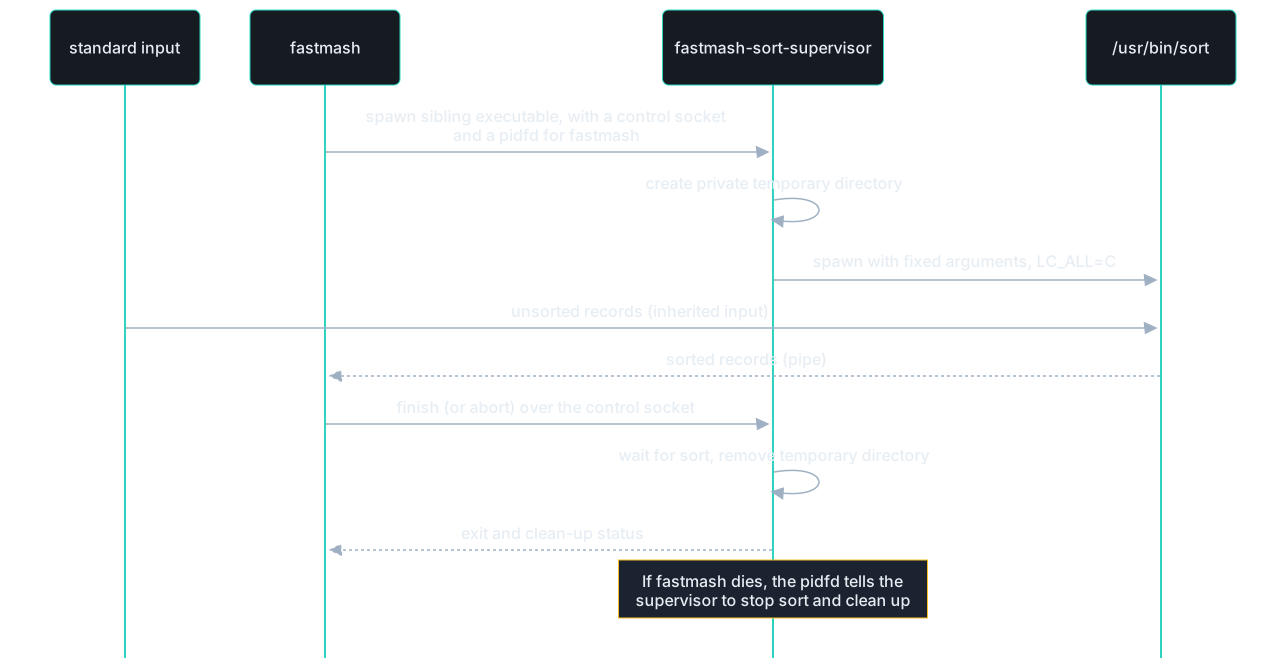
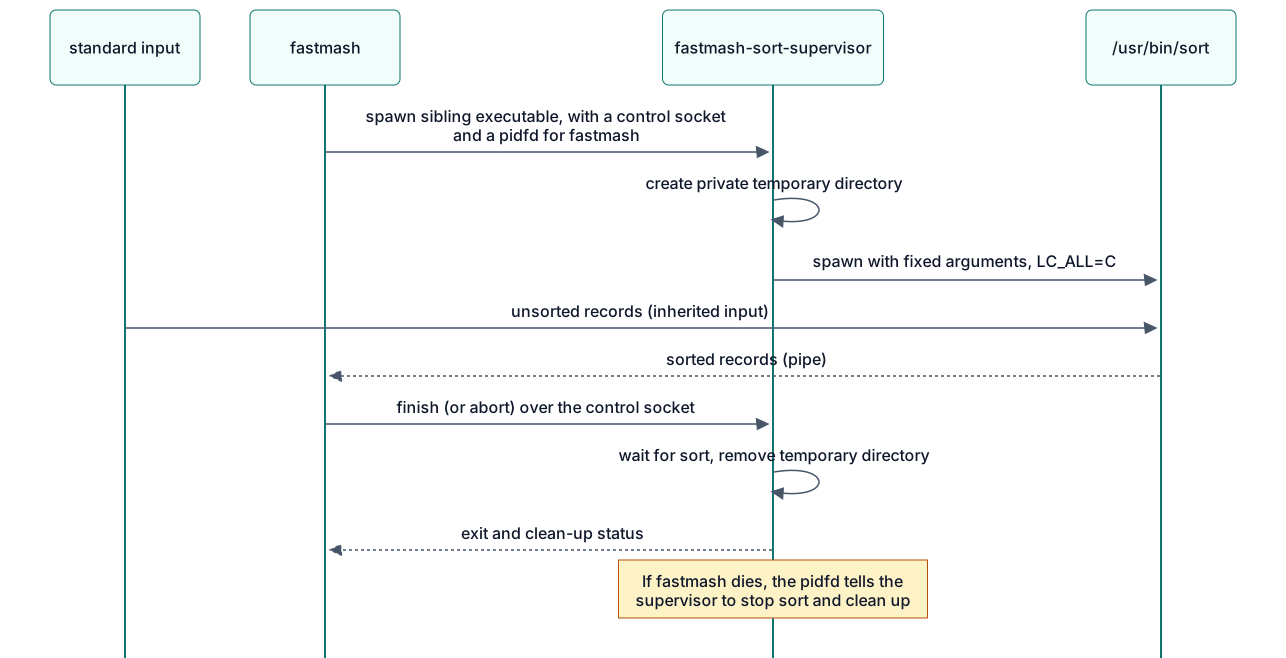
The control channel is a small fixed-format message protocol defined in
crates/sort-process/src/lib.rs. The supervisor uses Linux pidfds and
close_range, so this route needs Linux 5.11 or later.
Numbers
Numerical behavior is where Fastmash differs most from a straightforward port.
- Representation. Values are 80-bit extended precision (64-bit significand), the same range and precision GNU datamash uses on x86-64, so results agree closely with it.
- Software arithmetic. Instead of the x87 floating-point unit and the C math library, Fastmash implements the arithmetic itself. This is what delivers portable results: the output does not depend on the CPU model, the compiler, or the libm version.
logandexp. The geometric mean, the normality tests and similar statistics need transcendental functions. Fastmash aims for the correctly rounded 80-bit result: fast paths prove their result with a certificate and otherwise fall back to arbitrary-precision evaluation. A few boundary cases that cannot be settled within fixed limits are refused (status 77).- Ordered evaluation. Sums are accumulated in input order and formulas follow the same order of operations as GNU datamash, because reordering floating-point arithmetic changes results.
- Versioned numerical rules. Parsing, arithmetic, special values, formatting and refusals are specified together as a numerical profile. Any change to observable numerical output is a deliberate, versioned change listed in the changelog.
- Fast paths. Common cases, such as decimal inputs that can be summed exactly, take specialized paths that give the same result faster.
Errors and exit statuses
| Status | Meaning | Examples |
|---|---|---|
| 0 | Success | |
| 1 | Error in the command or its input | Unknown option, non-numeric value, missing field, write failure |
| 77 | Refusal | Unsupported feature or locale, checked allocation failure, numerical capacity reached |
| 70 | Internal failure | A violated numerical invariant or a failed numerical table identity check; please report it |
Diagnostics are written to standard error as fastmash: message, sometimes
followed by a hint: line suggesting a fix. When one failure follows another
(for example a failed write of the output after an error), the more serious
status wins: 70 over 77 over 1 (failure::combine). A diagnostic that cannot
be written makes the status 1. Other internal failures are reported with
status 77 (for example an internal conversion failure) or, since panics abort,
end the process with SIGABRT; all of them are bugs.
Safety
unsafecode is limited to operating-system interfaces (Linux system calls for standard streams, process supervision and temporary files), one fixed-size arena allocation in the numerics crate, one x86-64divinstruction for 128-by-64-bit division in decimal parsing, guarded by an assertion of its precondition, an x86-64 cache prefetch hint when a sorted chunk is read, which never dereferences its address, a glibcmalloptcall at startup that caps malloc arenas under an address-space limit, and unchecked slicing of a sort run file’s read buffer, whose bounds are kept as a documented invariant (checked slicing cost 4% on a spilling job). The conversion and numeric-contract crates forbidunsafeentirely. Every other crate denies unsafe operations insideunsafe fnwithout an explicit block and warns on anyunsafeblock without a// SAFETY:comment, which CI treats as an error.- Overflow checks stay on in release builds, and panics abort.
- No network, no shell. Fastmash never makes network connections and never
passes input to a shell. The only child processes are the sort
supervisor and the system
sortit starts, with a fixed argument list. - Dependencies are few and pinned. See
Cargo.toml.
Dependencies
| Dependency | Why |
|---|---|
rustc_apfloat | Software IEEE arithmetic for 80-bit values |
astro-float-num | Arbitrary-precision arithmetic for log and exp |
icu_collator, icu_locale_core | Language-locale text ordering from pinned Unicode data |
memchr | Fast byte searching for record and field splitting |
num-bigint, num-integer, num-traits | Exact decimal conversion |
base64, md-5, sha1, sha2 | The base64 and checksum operations |
libc | The C entry point and signal setup |
Where to start reading
| To understand | Start with |
|---|---|
| The overall flow | crates/cli/src/main.rs |
| Option parsing | crates/cli/src/options.rs |
| The operations: names, spellings, what each needs and shares | crates/cli/src/operation.rs |
| Command syntax: operations, selectors and modes | crates/cli/src/grammar.rs |
| Planning and shared work of a command’s operations | crates/cli/src/operation_set.rs |
| Binding named fields and grouping keys to the Input header | crates/cli/src/binding.rs |
| Reading records: comments, vnlog, the input header, read errors | crates/cli/src/intake.rs |
| Records and field splitting | crates/cli/src/records.rs |
| The sort route | crates/cli/src/sort_route.rs, sorted_input.rs (the system sort) |
| Hash grouping, and holding piped input to read it again | crates/cli/src/projected_hash.rs, replay.rs |
| Sorting and spill | crates/cli/src/projected_sort.rs, projected_spill.rs |
| A statistic, for example quantiles | crates/cli/src/ordered_statistics.rs |
| Output and exit status | crates/cli/src/command_output.rs, buffered_stdout.rs, failure.rs |
| Number parsing and printing | crates/conversion/src/; numeric fields: crates/cli/src/decimal.rs |
| Arithmetic | crates/portable-numerics/src/lib.rs, crates/cli/src/numerics.rs |
log and exp | crates/cli/src/mean_math.rs, guarded_log.rs, boundary_exp.rs |
Decision records
Architecture decisions are recorded in decision records. Read them before proposing a change to one of the principles above.
Testing
Fastmash’s job is to give the same answers as GNU datamash, faster, and to give them identically on every supported machine. Testing is organized around those three claims: correctness, compatibility and performance.


Quick start
All commands run from the repository root on Linux x86-64 or WSL2. The native Apple Silicon development gate described below runs on macOS 15 and 26.
cargo fmt --all --check                  # formatting
cargo clippy --workspace --all-targets -- -D warnings   # lints
cargo test --release --workspace         # unit and integration tests
cargo build --release                    # the binaries the corpus runs
python3 scripts/check_regressions.py --binary target/release/fastmash
python3 scripts/check_regressions.py --binary target/release/fastmash --stdin-file
Run the full suite with --release: memory-limit tests exercise the optimized
CLI. Debug builds can exceed those limits before reaching the behavior under test.
A change is ready for review when all of these checks pass locally. CI also runs
on pushes and pull requests against main once the repository is public;
private automatic runs skip their jobs, while manual runs remain available.
Layers
Unit tests
Each crate carries unit tests next to the code they test. Together with the integration tests there are more than 400 test functions, many of them table-driven over hundreds of inputs. They cover option and grammar parsing, record splitting, every operation’s edge cases (empty groups, NaN, signed zero, infinities, overflow), number parsing and formatting, and the arithmetic primitives.
cargo test -p fastmash-portable-numerics   # one crate
cargo test -p fastmash grammar             # tests whose names match "grammar"
Integration tests
crates/cli/tests/ runs the compiled fastmash binary as a user would:
arguments, standard input, standard output, standard error and exit status.
Each file covers one area, such as grouping, selectors, quantiles, record
separators or pipeline failures (closed pipes, unreadable input, full disks).
Native tests use the same command boundary. native_streams.rs covers inherited
descriptors and signals, terminal buffering and output faults; native_sort.rs
covers stable sorting, quoted CSV, complete records, selection, weighted
calculations, hash restart, piped replay, supported locales and forced spill.
Its interruption checks wait until a private run has been opened and unlinked
before sending a signal, then check temporary-storage cleanup. The ordinary CLI
suites still cover all operation families and the table-health, CSV, selection,
comparison and presentation extensions.
When you fix a bug, add an integration test that reproduces it.
Regression corpus
The regression corpus is a set of more than 3,000 commands, each with its exact expected standard output, standard error and exit status. Expected results for compatible behavior were observed from GNU datamash 1.9, running each case twice, on the reference hosts. Cases where Fastmash intentionally differs record Fastmash’s documented behavior instead; the differences page gives the reasons.
cargo build --release   # fastmash and fastmash-sort-supervisor, side by side
python3 scripts/check_regressions.py --binary target/release/fastmash --keep-going
python3 scripts/check_regressions.py --help
A run stops at the first mismatch and prints the case, the expected bytes and
the actual bytes. The cases give their input through a pipe; --stdin-file runs
those with ordinary input again with standard input as a regular file, against the same
expectations. Both modes need coverage: hash grouping applies to eligible files
and to eligible piped input in language locales, with different replay paths.
The frozen fixture and its provenance record stay byte-identical across platforms.
On macOS, the runner requires no supervisor and uses the native fault transports
below. --evidence-dir retains the executable and fixture hashes, per-case
dispositions, native observations and mismatches. Regular-file mode records the
transport cases it leaves to the piped run, instead of silently excluding them.
Compatibility cases
A change that affects observable behavior (output, a diagnostic, an exit
status) needs a matching expectation. For behavior that should match GNU
datamash, compare against a real datamash 1.9 and record what it does. For
an intended difference, update
Differences from GNU datamash
in the same pull request.
Numerical checks
Fastmash promises identical numerical results across machines, so arithmetic changes get extra scrutiny:
- Arithmetic primitives are tested against independently computed, high-precision reference values.
logandexpresults are checked against an independent arbitrary-precision library (MPFR), with emphasis on inputs whose results lie close to a rounding boundary.- Numerical rules are versioned together. A change to any numerical output is deliberate, reviewed and listed in the changelog, never silent.
The native release workspace run includes every retained v3 primitive and
exact-helper row in crates/portable-numerics/testdata/, the exact conversion
tests, and the independent MPFR logarithm/exponential challenge and range-boundary
fixtures in the CLI. record_separators::reproducibility executes representative
portable expectations through the command itself, including extreme exponents,
ordered numerical calculations and fixed random vectors. The installed command
run repeats those CLI expectations. No host GNU result replaces a fixture or
changes the portable-binary80-v3 profile. Generating new MPFR reference data and
running optional reference-host measurements are separate from consuming these
already retained independent fixtures.
Benchmarks
Performance claims come from representative jobs: real and synthetic datasets with the commands people run on them, grouped into job families such as decimal sums, quantiles and grouped text. Each job is timed for GNU datamash 1.9, the previous Fastmash build and the candidate, on the same host, alternating runs to reduce noise.
A performance change is accepted when it is faster on its target jobs and no existing job becomes materially slower (the predecessor guards). See the benchmark method for datasets, margins and hardware.
Supported test environment
| OS | Linux x86-64 with glibc, or WSL2 |
| Kernel | 5.11 or later, for the external sort route |
| Tools | Stable Rust (see rust-version in Cargo.toml), Python 3.10 or later, GNU or uutils coreutils sort |
| Temporary storage | A writable TMPDIR, such as ext4 or tmpfs |
Under WSL, keep the checkout and TMPDIR on the Linux filesystem rather than a
Windows drive: tests are much faster there.
Native Apple Silicon development gate
macos.yml requires actual Darwin, arm64, the expected macOS major version
and the aarch64-apple-darwin compiler host. Both macos-15 and macos-26 run
formatting, warnings-denied Clippy, the complete applicable release workspace
tests, and all 3,137 frozen cases with piped input plus the ordinary-input cases
with regular-file input. Successful version actions use the explicit development
version; their error and transport expectations stay frozen.
The jobs build the native Rust test transports explicitly and record their hashes. To run the same gate locally on a native supported Mac, create those helpers outside the checkout and name them before running the quick-start commands. This shell block uses Bash:
bash -c '
set -euo pipefail
helpers=$(mktemp -d)
trap '\''rm -rf "$helpers"'\'' EXIT
rustc --edition=2024 --crate-type=cdylib -C panic=abort -C opt-level=2 crates/cli/tests/support/full_output_interposer.rs -o "$helpers/full-output.dylib"
rustc --edition=2024 -C panic=abort -C opt-level=2 crates/cli/tests/support/full_output_probe.rs -o "$helpers/full-output-probe"
export MACOSX_DEPLOYMENT_TARGET=15.0
export FASTMASH_TEST_FULL_OUTPUT_LIBRARY="$helpers/full-output.dylib"
export FASTMASH_TEST_FULL_OUTPUT_PROBE="$helpers/full-output-probe"
cargo fmt --all --check
cargo clippy --workspace --all-targets --locked -- -D warnings
cargo test --release --workspace --locked
cargo build --release --workspace --locked
version=$(sed -n '\''s/^version = "\([^"]*\)"$/\1/p'\'' crates/cli/Cargo.toml | head -n 1)
python3 -B scripts/check_regressions.py --binary target/release/fastmash --expected-version "$version"
python3 -B scripts/check_regressions.py --binary target/release/fastmash --expected-version "$version" --stdin-file
'
The fixture’s stdout and exit-status expectations apply unchanged on macOS. These named dispositions adapt observation or diagnostics only:
| Mechanism or frozen case | Native disposition |
|---|---|
All 72 io=full cases and Rust full-stream tests | A test-only dyld interposer returns -1 with native ENOSPC for the selected stdout or stderr descriptor. A Rust probe checks the actual return and errno, ordinary and unselected writes must remain exact, and the actual candidate must pass calibration before a fault result is accepted. Corpus stdout uses a writable, nonterminal regular capture admitted with an actual 4,096-byte block size, preserving the frozen output buffer boundary and literal diagnostics; observations retain its destination facts. Linux keeps /dev/full. |
grouping-next:read-error, grouping-next:read-error-header, paired-private:grouped-read-error-after-result | The native late-input fault is armed after the frozen visible completed-group acknowledgement. Its native read fault retains literal final stdout, EIO and status 1. Linux keeps its real PTY master read error. |
sorting/header-empty, sorting/header-only-comments; record_separators::record_intake::full_warning_follows_the_sorters_error_without_an_input_header; ordinary aggregates in weighted_mean::sorted_named_empty_completion_keeps_header_errors_and_legacy_commands | The native route reports exactly fastmash: missing input header for named grouping key before any full warning. Linux retains its system-sort diagnostics and warning order. Both require empty stdout and status 1. |
weighted_mean::weighted_numeric_sort_eligibility_and_system_composition_are_exercised; mixed paired calculations in weighted_mean::sorted_named_empty_completion_keeps_header_errors_and_legacy_commands | Paired-operation composition uses the native Sort route on macOS and retains the system Sort route on Linux. Each platform checks its required route trace while report bytes stay identical. |
grouping-reference-r2:held-flush-pipe, grouping-reference-r2:held-flush-pipe-header, output-header-lifecycle:held-8192, header-writer-reference:pipe-large | The held prefix follows the actual destination’s fstat block size, capped at 8,192 bytes, with a zero size using 8,192. Prefix bytes are derived from the frozen output and the known pre-EOF output, rather than candidate output. The destination facts are retained. Final stdout, status, live held process and terminal line buffering remain checked. |
/usr/bin/timeout in shared direct-command helpers | A native pre-exec alarm bounds the command without a GNU utility dependency. Linux keeps its existing timeout wrapper. |
| Linux temporary-root and PTY metadata assumptions | Native helpers use private temporary directories and native descriptor metadata. Raw terminal flags and actual terminal behavior remain checked. |
Spill unit tests exhausted_merge_inputs_are_released_before_the_merge_ends, streaming_merge_and_truncated_runs_report_failures, full_fan_in_initialization_and_partial_consumer_failures_propagate | Native fstat identity checks verify early descriptor release. Linux retains /dev/full; Darwin uses a read-only /dev/null descriptor and its native EBADF to check immediate spill-write and buffered final-flush error propagation. Native CLI tests separately check calibrated ENOSPC. |
The following exclusions are specific to Linux mechanisms. They remain in the Linux gate; generic suites are not disabled wholesale on macOS:
| Test or component | Reason and native coverage |
|---|---|
All 16 tests in external_sort.rs, listed below, and the external implementation’s sort-process unit tests | They inspect or fault the Linux-only supervisor, pidfds, close_range, seccomp, child /proc entries or GNU sort scheduling. macOS never enters that route. Native sorting, bad TMPDIR, interrupted anonymous spill, long headers, separator bytes and inherited cancellation behavior are tested at the executed-command boundary. Sort supervisor identity and child-supervisor security have no native component. |
routing_tests::sigpipe_policy_in_isolated_test_processes, routing_tests::sigpipe_child | Their subprocess harness installs raw Linux syscall layouts. native_streams checks the actual CLI’s blocked and ignored signal inheritance, closed pipes, startup actions and sorted/comparison/health modes through native APIs. |
diagnostic_color::child_sort_diagnostics_are_forwarded_without_generated_styling | No child sort emits a diagnostic on macOS. native_missing_header_diagnostic_receives_the_selected_style checks the native diagnostic and selected styling instead. |
grouping::native_variable_allocation_refusal_is_explicit; text_summaries::text_allocation_failure_is_explicit; record_separators::transpose::transpose_allocation_failure_is_explicit_and_has_no_output; record_separators::crosstab::crosstab_allocation_failure_is_explicit | These faults depend on Linux address-space enforcement and calibrated small glibc process limits. Darwin address-space limits do not provide that fault. Checked-allocation unit fixtures, growable command tests and native spill refusal/error paths still run; these particular real allocation-failure thresholds remain Linux evidence. |
grouping::eight_thread_language_sorts_use_a_fraction_of_an_address_space_limit, including its paused_language_sort helper | The measurement inspects Linux /proc/PID/status and glibc arena reservation under RLIMIT_AS. macOS uses its documented conservative initial chunk target when Linux memory facts are unavailable; explicit small targets, language sorting and spill remain tested natively. |
text_summaries::text_final_output_is_written_without_a_second_copy | Its calibrated 32 MiB address-space allowance is a Linux observation. The native test still checks the full large output; it does not claim that Linux allocation threshold on Darwin. |
Ignored quantiles tests growth_and_sort_scratch_exhaustion_are_reported, percentile_and_trim_allocation_failures, robust_allocation_failures, dedup_allocation_failure_and_duplicate_heavy_stream | These opt-in Linux installed-binary tests require the calibrated address-space fault. Ordinary quantiles, robust operations, sample growth and output faults remain in the native run. |
Ignored installation::installed_pair_and_missing_companion | It requires a Cargo-installed Linux executable and Sort supervisor pair. The native archive installation test and standalone native-sort commands cover installation, startup and sorting without that component. installed_migration_examples runs explicitly against the native archive. |
| Other existing ignored named-reference, retained-dataset, locale-generation and timing tests | Their explicit reference, dataset or measurement prerequisites remain unchanged on both platforms. The retained workspace inventory and result log name them and their reasons. Native GNU comparisons are recorded separately, and cannot redefine portable expectations. |
The excluded external-sort tests are:
exec_sort_accepts_only_its_own_temporary_rootthe_exec_role_exits_77_whatever_its_standard_errorscratch_rejects_a_preexisting_directoryscratch_rejects_a_preexisting_symlinkexternal_sort_uses_tmpdir_and_cleans_itexternal_sort_threads_follow_gnu_sort_defaultsunusable_tmpdir_is_a_clear_errorunusable_tmpdir_sorts_small_input_in_processa_separator_byte_from_0x80_sorts_in_processa_missing_supervisor_sorts_in_processwithout_close_range_cloexec_jobs_sort_in_processinterrupted_external_sort_leaves_no_temporary_directorya_killed_sort_is_named_before_read_error_on_closea_long_header_in_a_file_is_read_in_chunksignored_cancellation_signals_fall_back_to_native_sortinga_companion_from_another_release_is_named
After both source gates pass, one macOS 15 job builds the checksummed development archive with a macOS 15 deployment target. Both installation jobs download those same bytes, execute the documented method outside the source checkout, and check checksum/download failure preservation. They repeat both corpus modes and the ordinary CLI suites through the installed executable, with explicit executable overrides. The existing opt-in prepared quantile headers, wide sorted headers and migration-example tests also run because their installed-binary prerequisite is then available. The hosted comparison example records exact candidate and GNU identities, output eligibility, seven alternating samples and observed variation. Its GNU installation serves this comparison only; installation itself requires neither Rust nor GNU coreutils.
Evidence lives under the runner’s temporary directory and is retained as CI artifacts: source revision, actual OS, compiler and flags, manifests, frozen fixture hashes, native helper hashes, binary/archive hashes, test inventories, logs, per-case dispositions and hosted comparison data. The checkout stays clean for archive provenance. A prepared workflow or an Apple-target compile check is not native runtime evidence, release qualification or a performance claim.
Website checks
The landing-page browser tests cover initial loading with a delayed script, installation tabs, clipboard fallback, reduced motion and access to every installation command without JavaScript. They use Puppeteer from the existing diagram tooling and its installed Chrome browser. For setup, see the demo tooling.
python3 -m unittest discover -s scripts -p 'test_build_site.py'
mdbook build docs
env FASTMASH_DIAGRAMS=committed python3 scripts/build_site.py docs/book
npm run test:landing
Use mdBook 0.5.4, as pinned by scripts/build_site.sh. Rebuild the book before
running the site builder again, since the builder transforms the generated HTML.
Continuous integration
| Workflow | When | What |
|---|---|---|
ci.yml | Public pushes and pull requests against main, or manual dispatch | Format, Clippy, release-mode tests, regression corpus on Ubuntu |
macos.yml | Public pushes and pull requests against main, or manual dispatch | Complete native source checks on macOS 15/26, one development archive, both installations, installed command/corpus checks and scoped hosted GNU observations |
docs.yml | Public pushes and pull requests against main, or manual dispatch | Builds the website and checks links |
release.yml | Manual dispatch on a version tag | Builds and tests release assets, then creates a draft release |
Glossary
The project’s vocabulary, used in code, documentation and issues.
Fastmash is a fast Rust command-line tool that computes statistics and table transformations over delimited text. It implements GNU datamash’s command language so that datamash workflows can move to it with few or no changes.
Use Fastmash for the product in prose and display text, and fastmash
for commands and identifiers, including package and repository names.
This glossary covers current behavior and selected post-release concepts. The user guide describes implemented capabilities.
Command language
Command:
One complete fastmash invocation: its options, an optional mode or grouping,
and its operations.
Avoid: Using “command” for a single operation
Operation:
One requested calculation or transformation, named with an optional :parameter
and applied to one or more fields, such as sum 2 or perc:90 3.
Avoid: Op, function, command
Operation parameter:
The optional value after an operation’s colon that adjusts it, such as the 90
in perc:90.
Operation family: A set of related operations that are documented, implemented or measured together, such as the quantiles or the paired statistics. Avoid: “Family” on its own (see Job family)
Mode:
The overall way a command processes its input: aggregating (optionally in
groups), Dataset comparison, crosstab, per-row operations, Top-N selection, or one of the field modes
and table modes.
Avoid: Using “mode” for the mode statistic
Per-row operation:
An operation that produces one output value for each input record rather than
one summary, such as round, base64, getnum or cut (which prints the
selected fields).
Avoid: Linewise operation, line mode, per-line operation
Field mode:
A mode that rearranges or passes through the fields of each record: reverse
and noop. cut is a per-row operation, as in GNU datamash, not a field mode.
Table mode:
A mode that treats the input as a whole table: check, transpose, rmdup
and health, which produces a Table health report.
Crosstab: A pivot table of one calculation over every pair of values of two grouping keys. Avoid: Cross-tabulation
Input
Record:
One logical input unit composed of fields. In ordinary delimited text, it ends
at a newline or, with -z, a NUL byte; quoted CSV permits line breaks within fields.
Avoid: Row (except for per-row operations), line
Field: One value within a record, addressed by its 1-based position or, with an input header, by its name. Avoid: Column (except when talking about headers and tables)
Field separator:
In ordinary delimited text, the single byte, or run of whitespace with -W,
that splits an input record into fields. Tab by default.
Avoid: Input delimiter
Quoted CSV: An explicitly selected input or output format with comma-separated fields, where double quoting permits commas, quotes and line breaks within a field.
Output delimiter: The byte written between fields of an ordinary delimited-text output record, following the Field separator unless set explicitly. CSV output uses commas between individually encoded fields.
Collapse delimiter:
The byte written between the values listed by unique and collapse. Comma by
default.
Selector:
The field argument within a Command, such as an Operation’s input or a Top-N
ranking field. Operations accept a single field, a list or range of fields,
or a LEFT:RIGHT field pair for paired operations; selection accepts one field.
Avoid: Field spec
Binding: The assignment of a Selector’s Fields and requested keys to positions in a dataset. Names use that dataset’s Input header; positional Fields keep their requested positions.
Input header:
A first record that names the fields instead of carrying data (--header-in, -H).
Output header:
A first output record that labels calculation results, such as sum(reading),
or copied fields in Top-N selection (--header-out, -H).
Result name:
A supplied label for an Operation-produced output column, including a selected
field from cut. It replaces the generated label, excluding Grouping keys and
the copied-field prefix from --full. In a Dataset comparison, it names one
summary result throughout that result’s before, after and change columns.
Full row:
A complete input record’s fields copied before calculation results with --full,
including Per-row results. CSV copies decoded field values, not their original
quote spelling.
Filler:
The text printed for a missing cell in crosstab and ragged transpose output
(--filler, N/A by default).
Missing value:
A field whose exact text is NA, N/A or NaN, in any letter case, which
--narm skips. An empty field is not a missing value.
Avoid: Null, blank
Grouping and sorting
Grouping key:
The field or fields whose equal values define a group (-g).
Avoid: Group field, sort key
Group:
A run of consecutive records with equal grouping keys. Records with equal keys
form one group only when they are adjacent, or when -s sorts them together first.
Top-N selection: Selecting at most N records by the highest or lowest values of one numeric ranking field, across a dataset or within each Group. Complete records appear in rank order, with earlier original input records winning ties.
Sort route:
The way Fastmash brings equal Grouping keys together for -s, by sorting in
memory with Spill as needed or, for ordinary delimited text, by another eligible
route such as Hash grouping or the system sort.
Hash grouping: A Sort route for eligible ordinary delimited-text input whose Grouping keys repeat: each Group’s records are collected as they arrive, and only the Groups are sorted. Where that cannot give the sorted result exactly, Fastmash reads the input again and sorts it, retaining piped input for that replay. Avoid: Hash mode, hash aggregation
Spill: Temporarily writing sorted runs to disk so that sorting large input does not need to hold all of it in memory. Only sorting spills; retained samples and tables stay in memory.
Sort supervisor:
The Linux helper executable, fastmash-sort-supervisor, installed beside fastmash,
that runs the system sort for the external sort route and cleans up after it.
Avoid: Companion, sorter process
Results
Table health report: A report of identified or suspected data-quality issues in a dataset, assessed against expectations for its fields and records.
Health expectation: A requirement for a field or record, supplied by the user or inferred from patterns in the data. Supplied requirements take precedence over inference.
Health finding: A reported observation, suspected inconsistency with an inferred expectation, or violation of a supplied expectation.
Health validation: Assessment of a dataset against supplied health expectations, with violations treated as validation failures. Inferred findings alone are advisory.
Weighted mean: An average in which each value contributes according to an associated weight: the sum of weighted values divided by the sum of their weights.
Contribution weight: A finite nonnegative number describing how much an observation contributes to a weighted mean. Zero contributes nothing; a valid mean needs positive total weight.
Dataset comparison: A report of differences between statistical summaries of two datasets.
Comparison key: An ordered tuple of complete Field byte strings, decoded for Quoted CSV, identifying corresponding summaries in a Dataset comparison. Each distinct key has at most one summary per dataset, independent of adjacency or quote spelling; its Records retain their encounter order.
Comparison ranking: Ordering matched Comparison keys by the magnitude of one selected result’s available difference or percentage. A limit caps ranked keys; every one-sided or unavailable key remains visible after them.
Portable results:
The product property that one Fastmash version gives identical results
(standard output and exit status) for the same input and explicit settings on
every supported platform, independent of the host’s CPU arithmetic, math library
or installed locale data. Diagnostics produced by the host’s own sort are
outside it.
Numerical profile:
A named, versioned set of rules for how Fastmash reads, computes and prints
numbers, such as portable-binary80-v3. It implements Portable results.
Avoid: “Profile” on its own
Supported locale: A locale whose number and text-ordering rules are built into Fastmash rather than read from the host. Other locales are refused when they would change a result.
Default output format:
How numbers print when neither --format nor --round is given: up to 14
significant digits.
Avoid: Default14 (the code identifier) in user-facing text
Refusal: Fastmash deliberately stopping instead of producing a result it cannot stand behind, with a diagnostic and exit status 77: for an unsupported feature, locale or condition, or a checked resource limit. Earlier output may already have been written. Avoid: Crash, “unsupported” as the general term
Capacity refusal: A refusal because a checked resource limit, such as memory or numerical precision, would be exceeded.
Error: A failure caused by the command or its input, such as a malformed selector, non-numeric data or a full disk, with exit status 1. Avoid: Refusal
Internal failure: A detected violation of Fastmash’s own invariants, never expected in normal use. Numerical invariant and table-identity failures exit with status 70; other internal failures exit with status 77 or abort the process. When one failure follows another, the status is the more serious: 70 over 77 over 1. A diagnostic that cannot be written makes the status 1.
Compatibility
GNU compatibility: Accepting GNU datamash 1.9’s options, operations and selectors and producing the same observable results as its reference profiles, except for Documented differences. Different GNU builds can disagree with each other; they do not override Portable results.
Documented difference: A specific, published behavior where Fastmash intentionally differs from GNU datamash, such as a refusal where GNU prints an unreliable value. Avoid: Deviation, mismatch (for intended differences)
Improvement: A measured or demonstrated advantage of Fastmash over GNU datamash, such as speed, a useful behavior or safety, for a stated workload or input.
Reference profile: A named GNU datamash build and host environment used to observe GNU’s behavior for comparison. Avoid: “Profile” on its own
Performance evaluation
Representative job: A concrete dataset and command pair that stands for a real workload and is used to compare Fastmash with GNU datamash and with earlier Fastmash builds. Avoid: Benchmark case, test job
Job family: A named group of representative jobs that exercise the same kind of work, such as startup, decimal accumulation or grouped text. Avoid: “Family” on its own, workload
Candidate: A specific Fastmash build, identified by its exact source and binary, that is being evaluated.
Host profile: The exact hardware, operating system and toolchain identity of a machine whose measurements count as evidence. Avoid: “Profile” on its own
Predecessor guard: A check that a candidate is not materially slower or more resource-hungry than the previous accepted Fastmash build on a given representative job. Avoid: Regression guard
Qualification: The evidence process that decides whether a candidate meets a stated acceptance criterion on a named host profile.
Admission: The check that a specific binary and host match an expected identity before their results count as evidence. Avoid: Using it for the broader Qualification
Releases
Preview release: A public, installable Fastmash release before the replacement release, with its supported operations, platforms and known differences stated. Avoid: Installable preview, development candidate
Replacement release: A release intended to replace GNU datamash in normal workflows, with broad compatibility, a performance advantage and a short explicit list of differences.
Decision records
These records explain the decisions that shape Fastmash and why they were made. Read the relevant one before proposing a change to what it covers. A decision can be revisited; do so with a new record that supersedes the old one.
| Record | Decision |
|---|---|
| 0001 | Implement the GNU datamash command language, independently |
| 0002 | Write everything in Rust, including the numerics |
| 0003 | Portable results through software arithmetic |
| 0004 | Refuse rather than guess |
| 0005 | Growable, checked storage instead of fixed limits |
| 0006 | Supervise the system sort for the remaining sort routes |
| 0007 | Linux x86-64 first |
| 0008 | Group sorted input by hash, and sort again when unsure |
| 0009 | Built-in locale tables, not the host’s locales |
| 0010 | Native Apple Silicon macOS, verified through hosted commands and installed archives |
0001: Implement the GNU datamash command language, independently
Status: accepted.
GNU datamash’s command language is widely used in scripts and documentation. Fastmash adopts it (operations, options, selectors, output layout and exit statuses 0 and 1) so that existing workflows move over with few or no changes, and aims to match GNU datamash 1.9’s observable results.
Fastmash is an independent implementation. It contains no GNU code, so it can be licensed under MIT OR Apache-2.0. Behavior is matched by studying GNU datamash’s documentation, source code and observed output, and every intentional difference is published.
Considered: a new, cleaner command language. Rejected, because compatibility is the main reason an existing datamash user would try Fastmash.
0002: Write everything in Rust, including the numerics
Status: accepted.
Fastmash is written entirely in Rust. The alternative was to keep the
numerical kernels in C, using the C library’s long double functions, which
would match GNU datamash’s arithmetic most directly. Fastmash implements them
in Rust instead, using C only as a comparison baseline during development, so
that the most delicate code stays within Rust’s safety checks and the project
stays a single-language codebase.
Consequence: Fastmash implements its own 80-bit arithmetic, parsing, formatting and transcendental functions, verified against independent high-precision references. That choice is also what made portable results possible.
0003: Portable results
Status: accepted.
Decision: one Fastmash version gives identical results for the same input and explicit settings on every supported machine, provided that the implementation meets the project’s accuracy and performance goals. Command compatibility with GNU datamash is kept, and specific numerical differences are assessed and documented one by one.
The alternative was to match whatever the local GNU datamash build prints. Different GNU builds can disagree in the last digit, so that target would be a moving one, while portable results give one expected answer that tests, users and CI can rely on. Matching the local GNU output byte for byte would ease some migrations; that benefit was judged smaller.
Current implementation: software 80-bit arithmetic that preserves GNU
datamash’s precision, range and order of evaluation, with log and exp
computed in software aiming for the correctly rounded result. The decision
fixes the property, not this particular engine: precision, algorithms and
dependencies may change, but any change to numerical output is versioned and
listed in the changelog.
Consequences:
- Fastmash can differ from a local GNU build in the last printed digit of some results, or the sign of a NaN. These differences are documented.
- Some extreme inputs that cannot be computed within fixed limits are refused (see 0004).
0004: Refuse rather than guess
Status: accepted.
When Fastmash cannot produce a result it can stand behind, it stops with a clear diagnostic and exit status 77 (a refusal), distinct from status 1 for errors in the command or input. Examples: a non-integer percentile, whose GNU datamash 1.9 result is undefined; an unsupported locale, where numbers might be read with the wrong decimal separator; a checked allocation that fails.
A separate status lets scripts and test harnesses distinguish “Fastmash declined” from “the input is wrong”.
Considered: matching whatever GNU datamash prints, even when that output is undefined. Rejected, because undefined output is not a compatibility target, and a plausible wrong number is worse than a clear refusal.
0005: Growable, checked storage instead of fixed limits
Status: accepted.
Fixed caps (record length, number of operations, number of samples) make resource use easy to reason about, but real workloads exceed them. Fastmash has no such caps: storage grows with the job, every allocation is checked, and allocation failure becomes a refusal where Rust and the operating system allow it. Sorting spills to disk to limit memory.
Consequence: memory use grows with the largest group for operations that
need every value, such as quantiles. This is documented, together with which
data spills and which does not. The only fixed limits left are GNU datamash’s
own, such as 99-byte --format strings and 511-byte names, and they are
documented.
0006: Supervise the system sort for the remaining sort routes
Status: accepted.
Fastmash sorts in process, with disk spill, for the common operations and
locales. For the remaining combinations it uses the system sort, as GNU
datamash does, but never directly: a small supervisor process starts sort
with a fixed argument list in a private temporary directory, watches the main
process through a Linux pidfd, and cleans up even if the main process is killed.
Consequences: Fastmash ships two executables. The external route is used
only where it works: Linux 5.11 or later, a GNU or uutils coreutils sort,
the supervisor installed beside fastmash, and the other conditions in
System requirements. Elsewhere those jobs sort in
process, with the same output. The in-process sorter is expected to take over
the remaining routes over time.
0007: Linux x86-64 first
Status: accepted.
Fastmash supports Linux x86-64 with glibc, and Windows through WSL2. Portable arithmetic already makes results independent of the platform, but process supervision, temporary files and signal handling are Linux-specific.
Support is kept to what can be tested and maintained with the hardware and continuous integration available to the project: current desktop and laptop Linux systems, one long-term-support Linux baseline for release binaries, and hosted CI. macOS on Apple Silicon is a later target, to be added when it can be built and tested on the same terms. Windows users run the Linux version through WSL2; native Windows is outside the current product scope.
0008: Group sorted input by hash, and sort again when unsure
Status: accepted.
GNU datamash sorts every record for -s, with a stable sort -s, so each of
its groups is exactly the records with one key, in input order. Typical inputs
have far fewer groups than records. When standard input is a regular file,
Fastmash therefore collects each key’s records into that group’s own
operation state as they arrive and sorts only the keys, reusing the sort’s key
order and the group writer, so the output is the sort’s. In a language
locale, it does the same for piped input, holding what it reads in memory so
that the input can be read again: the language-locale sort keeps whole
records, so the held input takes about as much memory as the sort would.
Where that could give a different result, Fastmash does not try to reproduce
the sort’s behaviour: before writing anything, it reads the input again from
its start and sorts it, in process or through the system sort, as the job
would have been sorted without hash grouping. That happens on a missing or
NUL key, a key the collation refuses, any operation error (so error messages
and line numbers are exactly the sort’s), too few records per group, or too
little memory. With -W, GNU’s sort keys keep the blanks before each field,
which groups ignore, so a group is keyed by its fields with those blanks, and
two keys that differ only in them may be one group or two: Fastmash gives up
there, and on a newline in a -z record, which the sort takes for a blank.
In a language locale, glibc ties some keys spelled differently at every
level (й, and и with a combining breve), which the stable sort keeps in
input order, a group per run of each spelling: Fastmash gives up when a new
key ties so with one already collected.
--vnlog and rand, whose results depend on more than each group’s own
records, always sort.
Considered: turning the collected groups into pre-aggregated sort records
when hashing stops paying, which reads the input once and also covers pipes,
but needs a serialized form of every operation’s state and must reproduce the
sort’s first error from stored state; its surface for mistakes is much
larger. Holding piped input in every locale: in the C locales the held
input takes several times the memory of a sort that keeps only the selected
fields, and some jobs are slower (FASTMASH_PIPE_GROUPING=hash still does
it). Writing held input beyond a budget to a temporary file: no gain where
the temporary directory is in memory.
Consequences: sorted jobs on files are usually several times faster and
use memory for the groups only, and piped jobs in a language locale three to
four times faster with the sort’s memory; piped input in the C locales
keeps the sort, so < file and cat file | can differ in time and memory,
not in output. A piped job that gives up late takes about a third longer
than the sort alone. A job that restarts
reads its input twice, and its output is that of the second reading, so a file
that changes while it is read gives the result of reading it later than a
program that reads once would. FASTMASH_GROUPING=sort always sorts.
0009: Built-in locale tables
Status: accepted.
Decision: Fastmash carries glibc’s locale rules in its own tables and does not read the host’s locales at run time. The tables cover how numbers are read and written in every UTF-8 locale glibc 2.43 defines, and how keys are sorted in the language locales whose sorting has been verified against GNU sort. They are identical on every machine and need no installed locale data, so a job in a bare container gives the same result as on a workstation.
A locale name glibc does not know behaves as C, as it does in GNU datamash.
Fastmash refuses sorting in a locale whose collation is not verified (such as
cs_CZ or nb_NO) and numbers whose separators it cannot write (such as
ps_AF, or a non-UTF-8 character set with a non-ASCII thousands separator,
like fr_FR in Latin-1), rather than guess
(0004).
Considered: reading the host’s locales, as GNU datamash does. That matches
GNU on each host, including its fallback to C where a locale is not
installed, but loses the reproducibility of
0003, needs glibc’s locale files at run time and a
second collation path, and greatly enlarges what must be tested.
Consequences:
- Fastmash differs from GNU datamash where a locale glibc knows is not
installed on the host (GNU falls back to
C, Fastmash uses its tables), and where the host’s glibc locale data differs from 2.43. - A job blocked by an unsupported locale is answered by adding that locale from glibc’s data, not by reading host locales.
- The tables follow glibc 2.43. Regenerate them when a glibc release changes
locale data that Fastmash uses, or when a user reports a difference:
scripts/generate_numeric_locales.pywrites the number table, checked withscripts/compare_numeric_locales.py;scripts/verify_collation_locales.pychooses and verifies the sorting locales; andscripts/generate_collation_glibc.pywrites glibc’s treatment of the characters it collates apart from letters. Their inputs and results are indata/locales/.
0010: Native Apple Silicon macOS
Status: accepted for development. The published 0.1.0 platform scope remains ADR 0007: Linux x86-64 first.
Add native aarch64-apple-darwin support with macOS 15 as the minimum, verified
on native hosted macOS 15 and 26 runners. Cross-compilation cannot establish
runtime support, and the maintainer has no macOS hardware. Support requires
the complete applicable Command contract and Numerical profile checks, plus
installation and execution of the same checksummed archive on both baselines.
Once delivered in a release, this platform scope supersedes ADR 0007.
Use the built-in Sort route, including Spill, on macOS. Keep Linux external supervision and its helper confined to Linux. Native OS primitives implement standard streams, signals, randomness, terminal detection and private temporary storage; software arithmetic and built-in locale rules preserve Portable results under ADR 0003: Portable results.
Build the archive once with MACOSX_DEPLOYMENT_TARGET=15.0, record source,
compiler, flags and hashes, and install those bytes outside the checkout.
The archive contains one executable with target-specific license notices.
The installer uses macOS’s checksum tool and retains an existing installation
when a download or checksum fails. CI artifacts are development evidence;
publishing a release remains a separate maintainer action.
Intel macOS, macOS before 15, native Windows and macOS external supervision remain outside scope. Hosted GNU comparisons describe the tested workloads and runners, without carrying Linux benchmark claims over to macOS.
About
Fastmash was created by Peder Bergan, who designs, builds and maintains it.
The project started from a practical question: can a tool people use every day in data pipelines be made substantially faster, without asking them to change their commands, and without giving up correctness? Fastmash answers it with careful engineering: a Rust implementation of the whole GNU datamash command language, arithmetic that gives identical results on every machine, and performance claims backed by published measurements.
Acknowledgements
Fastmash follows the interface of GNU datamash, created by Assaf Gordon and maintained by its contributors. Fastmash is an independent project and is not affiliated with or endorsed by the GNU Project.
Contact
- Bugs and feature requests: GitHub issues
- Questions and ideas: GitHub discussions
- Security: see the security policy
- Anything else: pederbe.dev